

 Zyntra OS
 Zyntra Legal
 Zyntra Real Estate
 Zyntra Hotel
 Zyntra E-commerce
 Zyntra Appointments
 Zyntra Repair
 Zyntra Garage
 Zyntra Concierge
 Zyntra Contracting
 Zyntra Clinic
 Zyntra Dental
 Zyntra School
 Zyntra University
 Zyntra Call Center
 Zyntra OTA
Where
Sales › Point of Sale › POS settingsWho
People with Point of Sale — Set up tills, promotions and settings.1
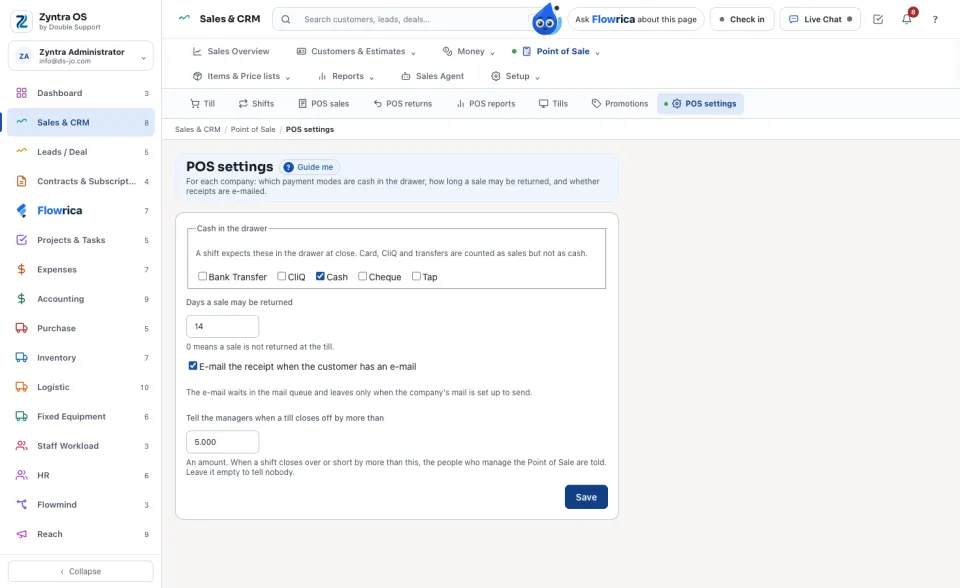
Under Cash in the drawer, tick the payment modes the drawer holds at close. Card, CliQ and transfers are counted as sales but not as cash.
2
Days a sale may be returned: 0 means a sale is not returned at the till. Tick E-mail the receipt when the customer has an e-mail to send it; it waits in the mail queue until the company's mail is set up to send.
3
In Tell the managers when a till closes off by more than, type an amount, for example 5. When a shift is closed with the cash counted over or short by more than this, everyone who manages the Point of Sale of that company gets a notice saying by how much. Leave it empty to tell nobody. Press Save.
The cashier closes the day as before, under Point of Sale › Shifts, or in the Flowrica app under Home › Field and shop › Close the day: type the Cash counted, see what the till should hold, and give the reason when it differs. Nothing is closed until Close the shift is pressed.
Questions
Where is “POS settings and the day-close limit” in Zyntra OS?
Sales › Point of Sale › POS settings
Who can use “POS settings and the day-close limit”?
People with Point of Sale — Set up tills, promotions and settings.