

 Zyntra OS
 Zyntra Legal
 Zyntra Real Estate
 Zyntra Hotel
 Zyntra E-commerce
 Zyntra Appointments
 Zyntra Repair
 Zyntra Garage
 Zyntra Concierge
 Zyntra Contracting
 Zyntra Clinic
 Zyntra Call Center
 Zyntra OTA
Where
Sales & CRM › Customers & Estimates › Estimate requestsWho
Anyone allowed to handle estimates.Requests arrive from your web forms (press 📋 Forms to make one), or you log one that came by phone or in person.
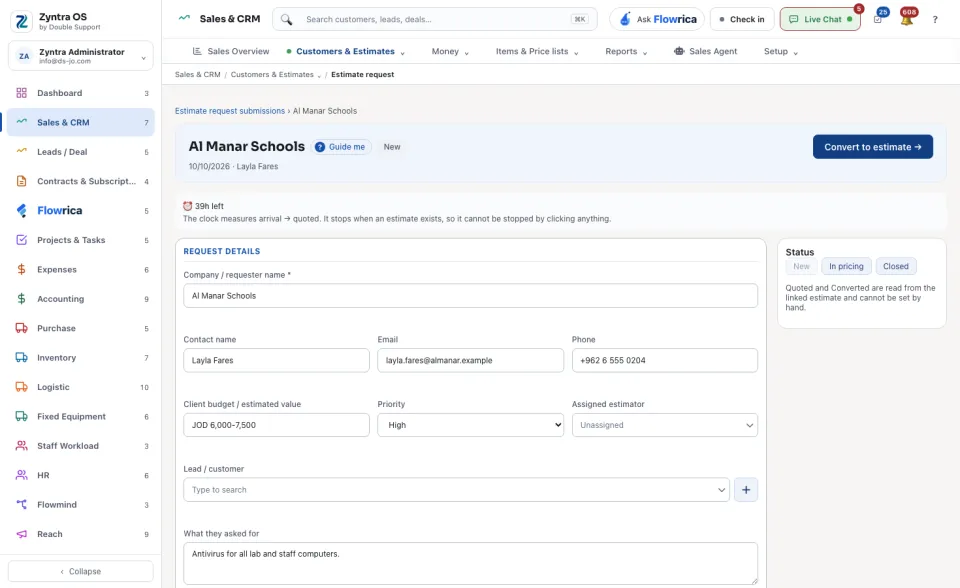
A request is New, In pricing, Quoted, Converted or Closed. You set New, In pricing and Closed by hand at the foot of the request; Quoted and Converted are read from the linked estimate. A clock measures the time from arrival to the estimate, and stops only when an estimate exists.
The list
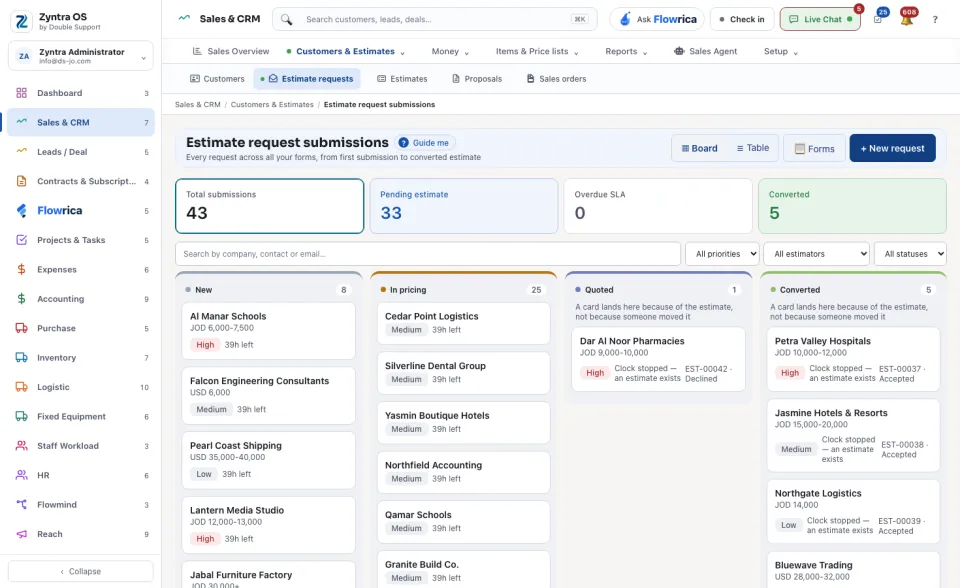
Four cards count Total submissions, Pending estimate, Overdue SLA and Converted. ▦ Board shows the requests as a column for each status, each card with its budget, its priority and how late it is; ☰ Table shows them as rows.
What Flowrica does here
On a request, Flowrica's read says whether what was asked for matches your catalogue, and offers Draft the estimate and Draft a deal: she prepares it and nothing is saved until you press the form's own button. She also writes a reply you can send yourself (Copy). On the list she can build a request form with you (Build a request form).