

 Zyntra OS
 Zyntra Legal
 Zyntra Real Estate
 Zyntra Hotel
 Zyntra E-commerce
 Zyntra Appointments
 Zyntra Repair
 Zyntra Garage
 Zyntra Concierge
 Zyntra Contracting
 Zyntra Clinic
 Zyntra Call Center
 Zyntra OTA
Where
Leads / Deal › Leads › the lead › Convert to DealWho
Anyone allowed to convert leads.1
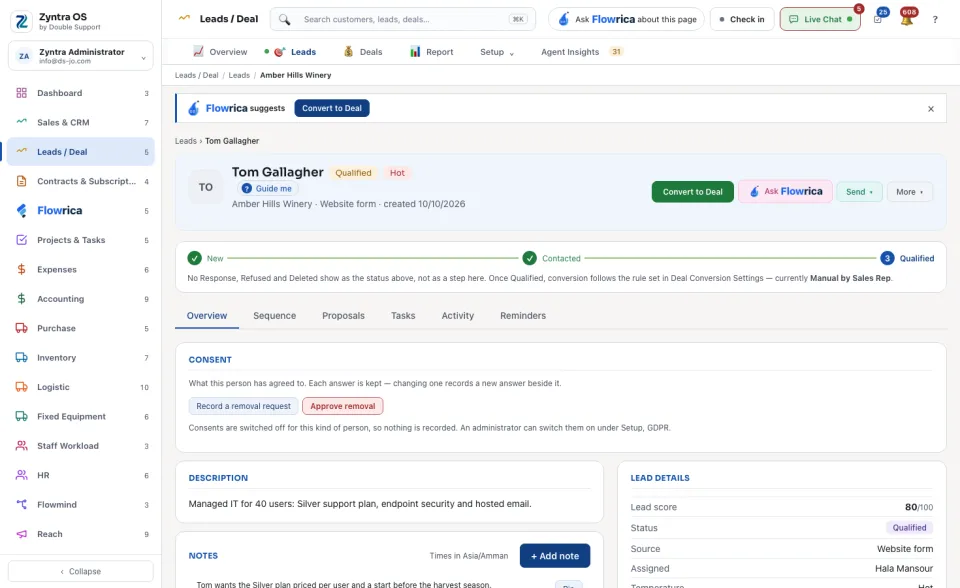
Open a lead whose status is Qualified. Press Convert to Deal in its head (the band
Flowrica suggestsat the top offers the same button).
2
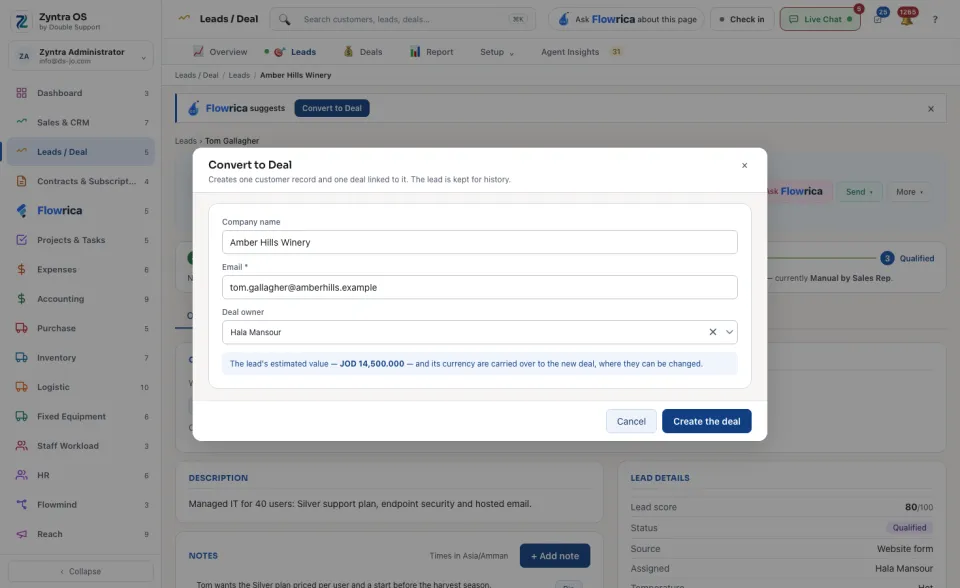
Check the Company name and the Email (both taken from the lead; the email must be filled), and choose the Deal owner. The lead's estimated value and currency carry over to the deal. If the lead has no value, the dialog says the deal starts at zero.
3
Press Create the deal. The new deal opens. In the list the lead now reads Converted to Deal, and clicking it opens the deal.
The line under the lead's steps says which rule conversion follows. The rule is set in Deal Conversion Settings.
A deal can also be made straight on an existing customer, for a renewal or an upsell: see Your deals.
Before: Add a lead · Next: Win or lose a deal