

 Zyntra OS
 Zyntra Legal
 Zyntra Real Estate
 Zyntra Hotel
 Zyntra E-commerce
 Zyntra Appointments
 Zyntra Repair
 Zyntra Garage
 Zyntra Concierge
 Zyntra Contracting
 Zyntra Clinic
 Zyntra Call Center
 Zyntra OTA
Where
Sales & CRM › Money › Batch PaymentsWho
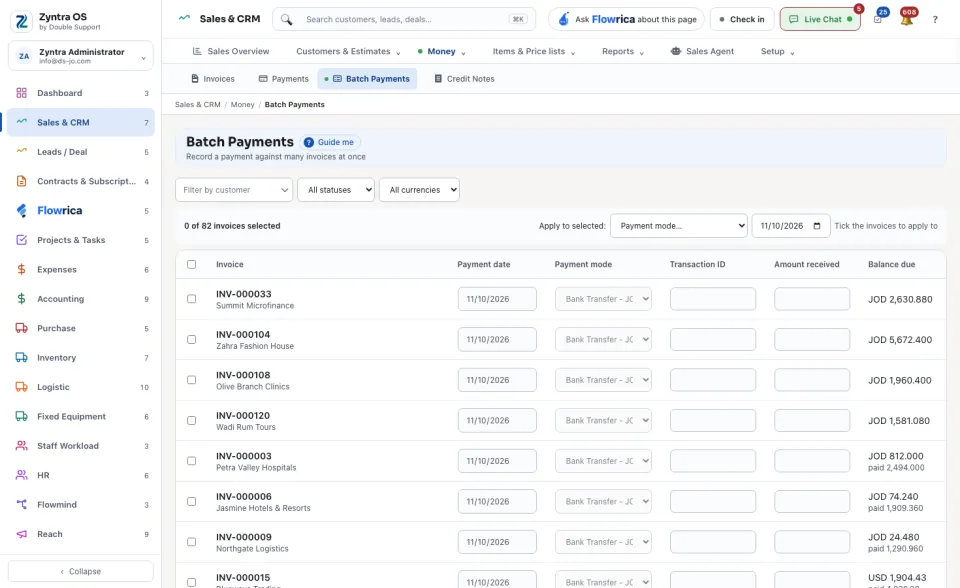
Anyone allowed to record payments.The screen lists every invoice that still owes money, with its customer and its Balance due.
1
Narrow the list by customer, status or currency, and tick the invoices that were paid. A line above the list says how many are selected.
2
Beside Apply to selected: choose a payment mode and a date, and press the button that applies them to the ticked invoices. Then fill in each row's Amount received and Transaction ID.
3
Press the save button at the foot; it counts the payments it will record. The system says how many payments it recorded, and in how many batches.
Mixed currencies are saved as separate batches automatically. A ticked row with no amount is skipped. Tick Don’t email the customers to record them quietly.
Previous batch runs at the foot lists each earlier run with its time, its number of payments, its total and its batch number.
Before: Record a payment