

 Zyntra OS
 Zyntra Legal
 Zyntra Real Estate
 Zyntra Hotel
 Zyntra E-commerce
 Zyntra Appointments
 Zyntra Repair
 Zyntra Garage
 Zyntra Concierge
 Zyntra Contracting
 Zyntra Clinic
 Zyntra Call Center
 Zyntra OTA
Where
Reach › Settings › CategoriesWho
Anyone allowed to change the Reach settings.1
Open Categories and press + New category.
2
Type the Name. Choose what it groups: Segments, Stages, Points, Emails, Text messages, Campaigns, Assets or Forms. Choose a Colour if you use them.
3
Press Save category.
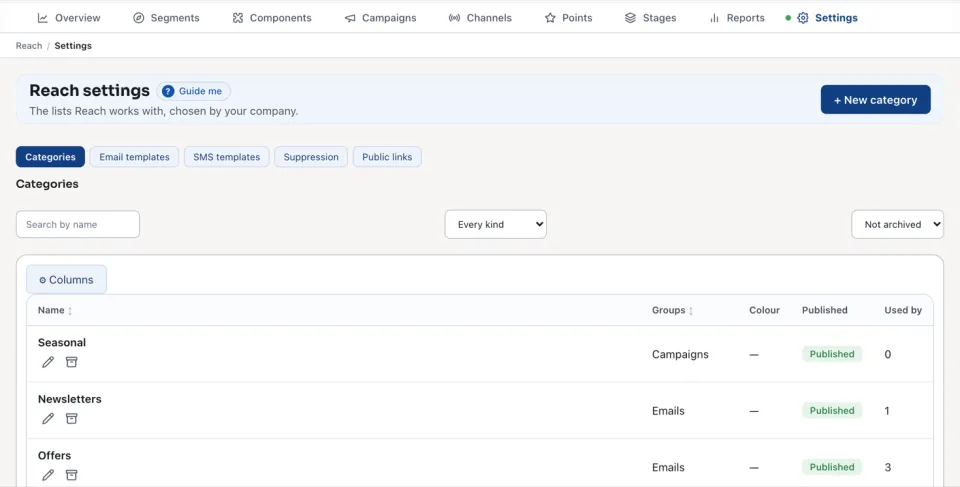
In any Reach form, + add one beside Category adds a category without leaving the form. The list shows each category's Name, the Groups it serves, its Colour, whether it is Published and what it is Used by. Search by name finds one, and Every kind shows them all.
Archive stops a category being offered. What already carries it keeps it, marked archived.
Questions
Where is “Reach categories” in Zyntra OS?
Reach › Settings › Categories
Who can use “Reach categories”?
Anyone allowed to change the Reach settings.