

 Zyntra OS
 Zyntra Legal
 Zyntra Real Estate
 Zyntra Hotel
 Zyntra E-commerce
 Zyntra Appointments
 Zyntra Repair
 Zyntra Garage
 Zyntra Concierge
 Zyntra Contracting
 Zyntra Clinic
 Zyntra Call Center
 Zyntra OTA
Where
Reach › Settings › Public linksWho
Anyone allowed to change the Reach settings.| Kind | What it is |
|---|---|
| Asset download | A person's own link to an asset. |
| Unsubscribe | A person's own unsubscribe link. |
| Tracked link | A link in an email's text, counted when it is pressed. |
| Read marker | What tells Reach an email was read. |
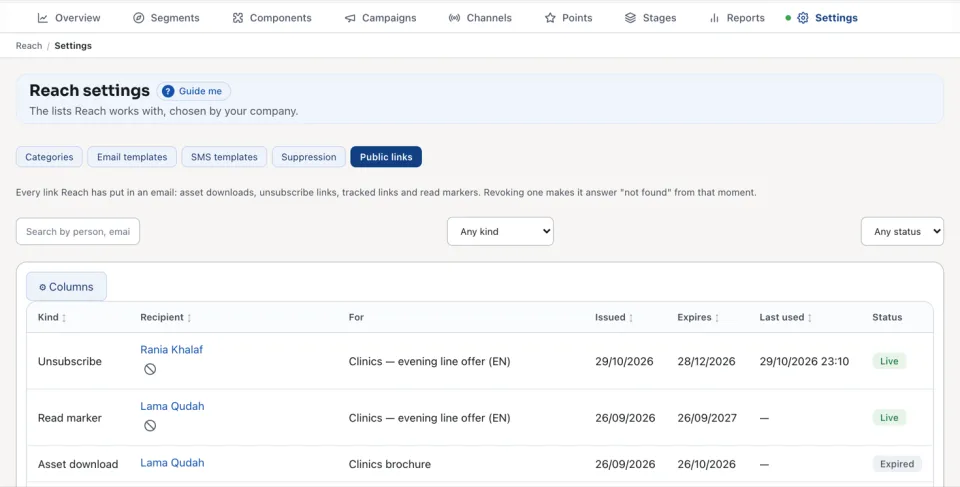
Each link is Live, Expired or Revoked. The columns say its Kind, Recipient, what it is For, when it was Issued, when it Expires and when it was Last used.
1
Find the link: Search by person, email or asset, Any kind, Any status.
2
Press Revoke. Choose Just this link, or every live link sent to that person, and say Why.
3
Confirm. The link stops working now. This cannot be undone; a new email gives the person a new link.
On an asset, Revoke all stops every live link to it at once. Under How long links last set the lengths new links use and press Save lengths; links already sent keep theirs.
Questions
Where is “Reach public links” in Zyntra OS?
Reach › Settings › Public links
Who can use “Reach public links”?
Anyone allowed to change the Reach settings.