

 Zyntra OS
 Zyntra Legal
 Zyntra Real Estate
 Zyntra Hotel
 Zyntra E-commerce
 Zyntra Appointments
 Zyntra Repair
 Zyntra Garage
 Zyntra Concierge
 Zyntra Contracting
 Zyntra Clinic
 Zyntra Call Center
 Zyntra OTA
Where
Reach › OverviewWho
Anyone allowed to see Reach.How Reach works
1
Segments say which leads you mean. A segment is a saved question about your leads.
2
Components are what a campaign shares: files (Assets) and website forms (Forms).
3
Campaigns take the leads of a segment through steps you build.
4
Channels hold the emails, text messages and WhatsApp messages Reach sends.
5
Points and Stages mark how far each lead has come.
6
Reports show what happened, and Settings hold the lists Reach works with.
The overview
Choose the period at the top: This week, This month, Last month, Last 3 months, This quarter, Last quarter, This year or Last year. ↻ Refresh counts again.
The cards count the Running campaigns, the Leads that entered a segment, the Emails sent, the Conversion rate, the Segments and the Reach points given. Press a card to open what it counted.
| Part | What it shows |
|---|---|
| Lead stats | The leads created and converted, by day. |
| Segment breakdown | The leads created in the period. Each lead is counted once, under the first segment it entered. |
| Email engagement | How many emails were delivered, read and clicked. |
| Points snapshot | The points given and taken away. |
| Recent activity | The last things done in Reach. View all in the audit trail opens the full list. |
| Upcoming in the next 30 days | What ends or resumes soon. |
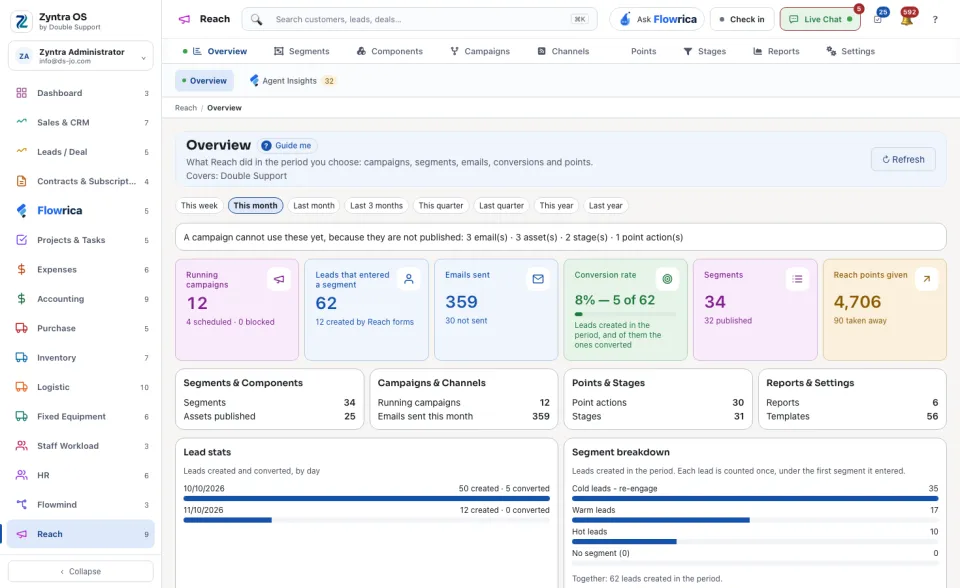
The second view, Flowrica Insights, lists what Flowrica noticed in Reach.
Flowrica on this screen
Press Guide me and Flowrica points at each part of the screen. She can make a segment or a campaign with you, one question at a time. Nothing is saved until you press the form's own button.