

 Zyntra OS
 Zyntra Legal
 Zyntra Real Estate
 Zyntra Hotel
 Zyntra E-commerce
 Zyntra Appointments
 Zyntra Repair
 Zyntra Garage
 Zyntra Concierge
 Zyntra Contracting
 Zyntra Clinic
 Zyntra Call Center
 Zyntra OTA
Where
Reach › Settings › SuppressionWho
Anyone allowed to change the Reach settings.| Reason | How the address got here |
|---|---|
| Unsubscribed | The person pressed the unsubscribe link in a Reach email. See When someone unsubscribes. |
| Hard bounce | Mail to the address came back for good. |
| Complaint | The person reported a Reach email. |
| Added by hand | Someone on your team added it. |
1
Open Suppression and press Add an address.
2
Type the address and a Note that says why, and save. From then on every send to it says Not sent — on the suppression list.
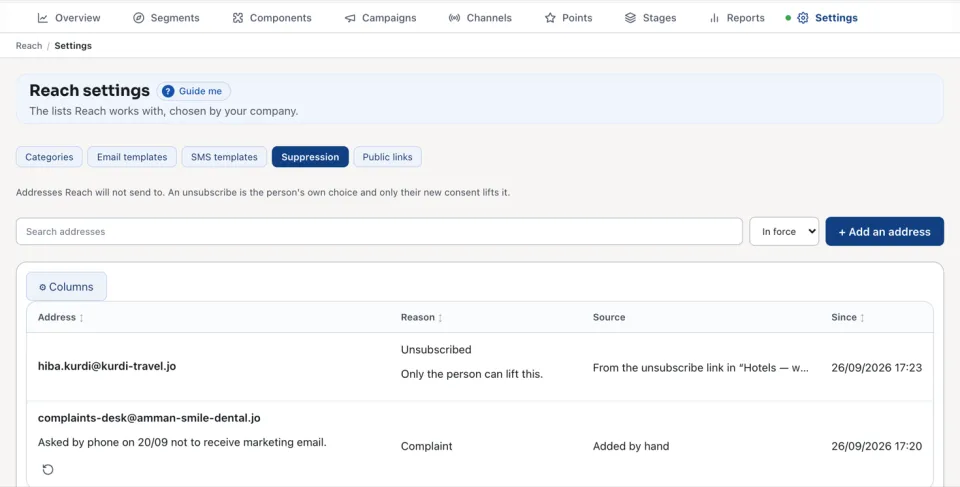
To let Reach write to an address again, press Lift on its row and say Why is it being lifted? The entry is kept in the history under Lifted. An unsubscribe has no Lift: it says Only the person can lift this.
The list shows the addresses In force or Lifted, with each one's Address, Reason, Source and Since. Search addresses finds one.
Questions
Where is “Who Reach does not write to” in Zyntra OS?
Reach › Settings › Suppression
Who can use “Who Reach does not write to”?
Anyone allowed to change the Reach settings.