

 Zyntra OS
 Zyntra Legal
 Zyntra Real Estate
 Zyntra Hotel
 Zyntra E-commerce
 Zyntra Appointments
 Zyntra Repair
 Zyntra Garage
 Zyntra Concierge
 Zyntra Contracting
 Zyntra Clinic
 Zyntra Call Center
 Zyntra OTA
Where
Reach › Components › AssetsWho
Anyone allowed to create Reach components.1
Open Assets and press + New asset.
2
Type the Name and choose the Category if you use them.
3
Under File, drop the file or choose one: PDF, images (PNG, JPG, WEBP, GIF), Word, Excel and PowerPoint files, ZIP or MP4, up to 20 MB. It is stored privately, never in a public folder.
4
Press Save asset. To share it, choose it under Asset to share in a Reach email. See Write a Reach email.
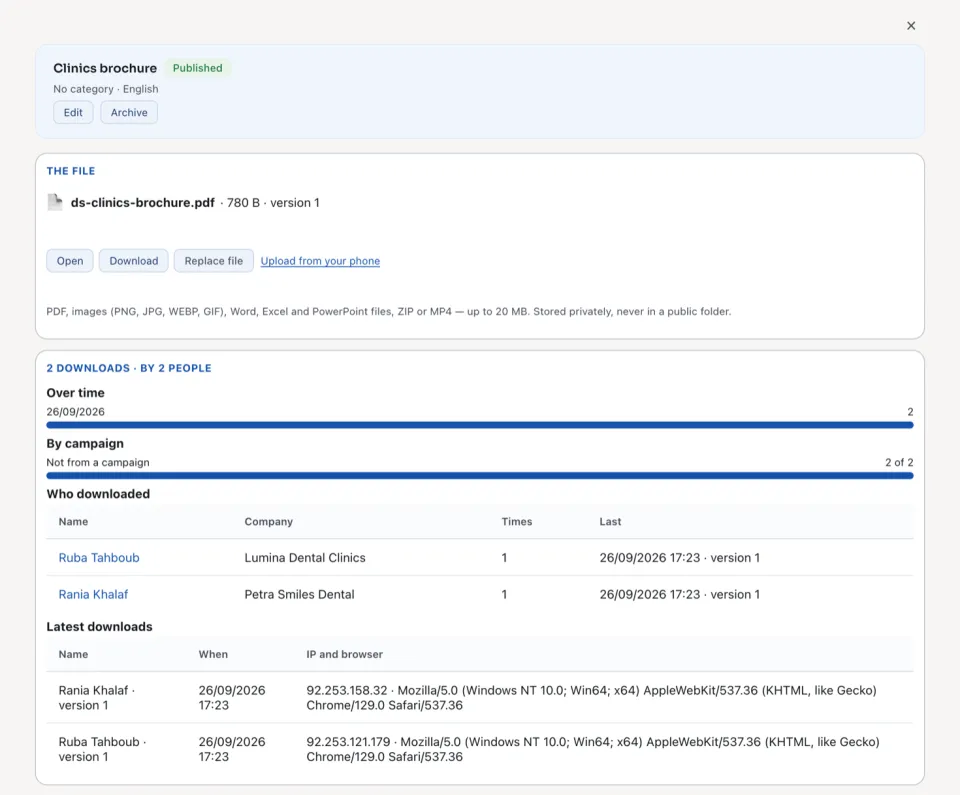
| Part | What it shows |
|---|---|
| The file | Its name, size and version, with Open, Download and Replace file. A replaced file is a new version; the links already sent keep the version they were sent with. |
| Over time | The downloads, day by day. |
| By campaign | How many downloads came from each campaign, and how many were Not from a campaign. |
| Who downloaded | Each person, their company, how many Times and the Last one. |
| Latest downloads | When, and the IP and browser. These are removed after the kept period. |
Archive keeps the asset with its downloads. Its links stop working at once; restoring it reopens those not yet expired.
Questions
Where is “Reach assets and who downloaded them” in Zyntra OS?
Reach › Components › Assets
Who can use “Reach assets and who downloaded them”?
Anyone allowed to create Reach components.