

 Zyntra OS
 Zyntra Legal
 Zyntra Real Estate
 Zyntra Hotel
 Zyntra E-commerce
 Zyntra Appointments
 Zyntra Repair
 Zyntra Garage
 Zyntra Concierge
 Zyntra Contracting
 Zyntra Clinic
 Zyntra Call Center
 Zyntra OTA
Where
Leads / Deal › Leads › a lead › Reach pointsWho
Anyone allowed to see Reach points. Correcting a row needs the right to edit Reach points.Reach points are not the lead's Sales score: that score is a separate number higher on the page. The card shows No points yet until something gives points.
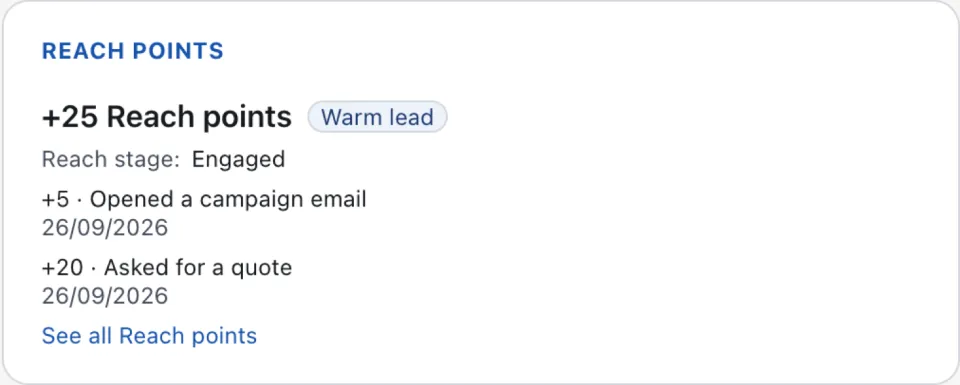
| A row says | Where the points came from |
|---|---|
| A point action | The lead did something a point action rewards. See Reach points. |
| Automation: … | A campaign or a Flowmind rule gave them, with the step Reach: award points. |
| No activity | Points taken away because the lead had gone quiet. |
| Limit reached | A point action's limit was reached; no points were given. |
| A correction | Someone took the points of another row back. |
1
Press See all Reach points. The lead's full list opens on Reach › Points.
2
On a row that is wrong, press Correct. It adds a row that takes these points back. The first row stays, marked corrected.
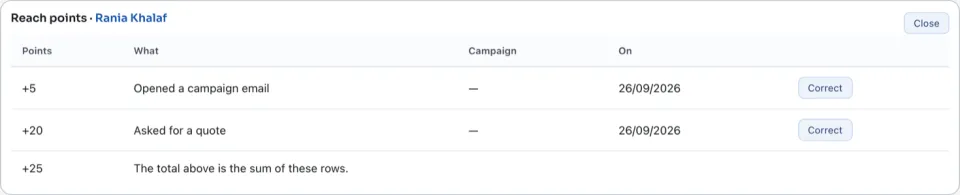
The total above is the sum of these rows. Nothing is rubbed out: a correction is a new row.
Questions
Where is “A lead's Reach points” in Zyntra OS?
Leads / Deal › Leads › a lead › Reach points
Who can use “A lead's Reach points”?
Anyone allowed to see Reach points. Correcting a row needs the right to edit Reach points.