An engineering change is how a product's bill of materials or routing changes: why it changes, the proposal side by side with what it changes, its approval, and the day it takes effect. Until that day, the factory keeps making the product as before.
Where
Manufacturing › Engineering changes
Who
«Read engineering changes» reads them. «Raise and edit engineering changes» raises one, edits it while it is a draft, sends it for approval, withdraws it and adds its files. «Approve or reject engineering changes» decides. «Apply engineering changes» applies an approved change on or after its day.
The changes
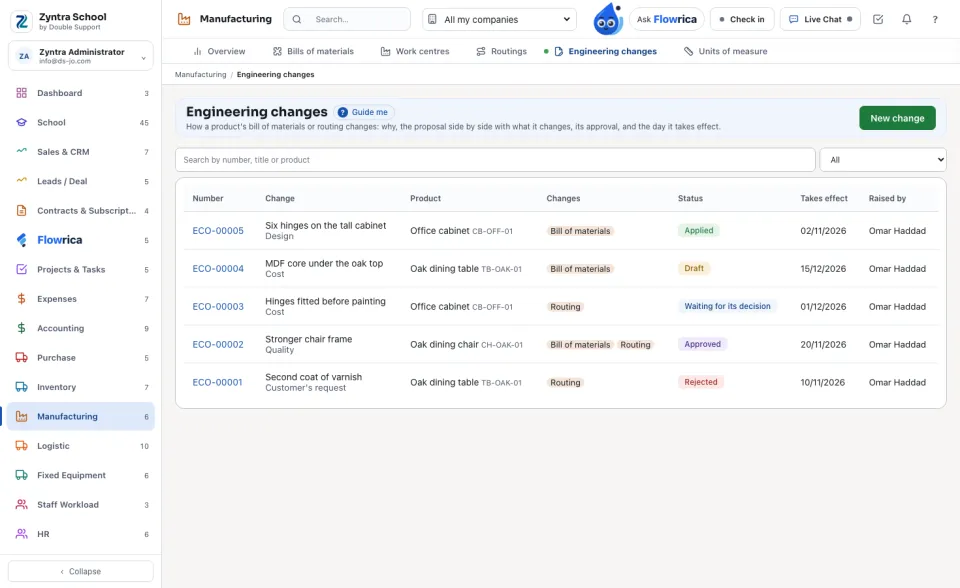
Each change shows its Number, what it is, its Product, whether it changes the Bill of materials, the Routing or both, its Status and the day it Takes effect. The list opens on The open ones; choose another state, or All, above it.
Raise a change
1
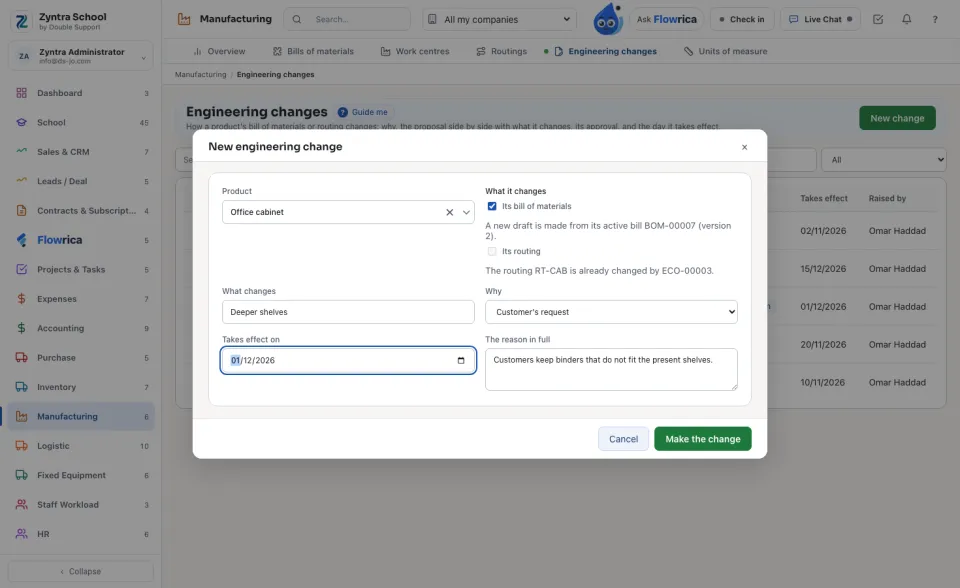
Press New change and choose the Product. Tick what it changes: Its bill of materials, Its routing, or both; when the product has more than one routing, choose Which routing.
2
Type What changes in a few words, choose Why (design, cost, quality, supplier, customer's request, regulation or other), write The reason in full and the day it Takes effect on, then press Make the change.
3
The proposal is made for you: a new draft of the bill of materials copied from its active version, and a copy of the routing that waits archived until the change is applied. Press Edit the proposed bill of materials or Edit the proposed routing and change them on their own screens, as any draft.
If the product already has a draft bill of materials, that draft becomes the change's proposal.
The difference
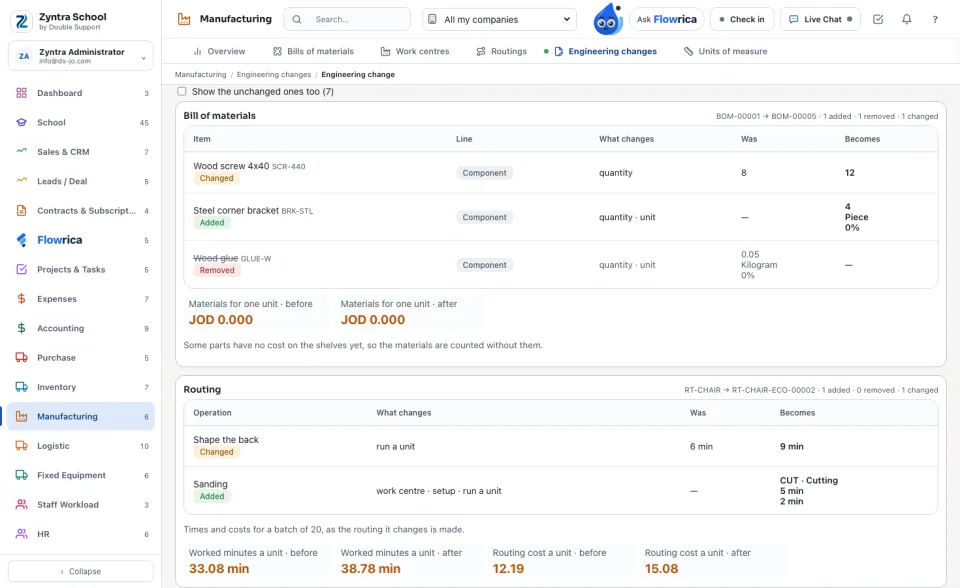
The Difference tab puts the proposal beside what it changes. Each line of the bill and each operation of the routing is Added, Removed, Changed (with what changed: quantity, unit, scrap %, work centre, run a unit…) or The same; tick Show the unchanged ones too to see them all. Under them, the worked minutes and the routing cost of one unit, before and after, and for who may see costs, the materials of one unit.
Where it touches lists the open production orders made by the old version, and the bills of materials that take this product. Nothing is moved for you: the planner decides about each order.
Approve and apply
1
Press Send for approval. From then on the proposal is kept as the approvers see it; nobody changes it.
2
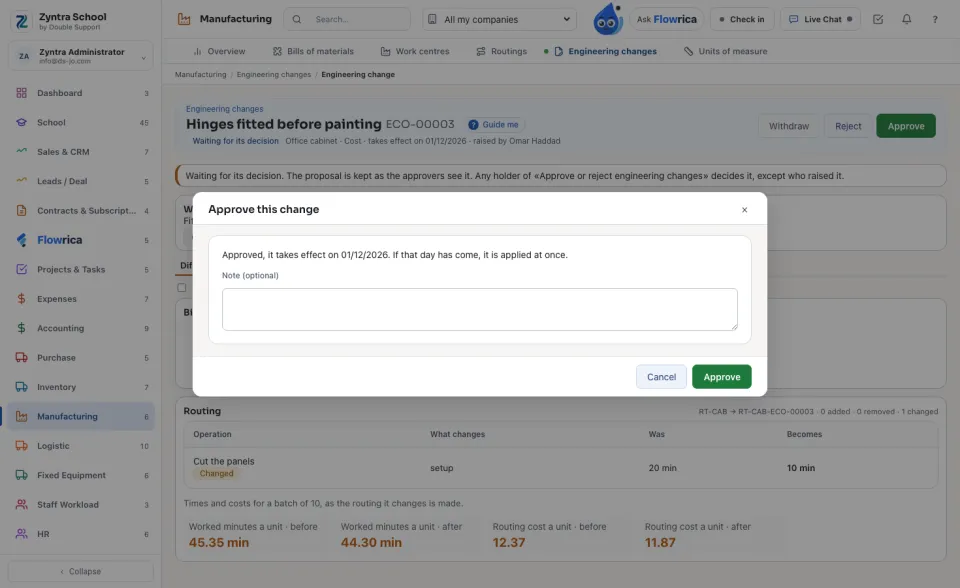
When your company keeps an approval chain for engineering changes (Inventory › Settings › Approval Settings), its steps decide it. Otherwise any holder of «Approve or reject engineering changes» decides it, except who raised it. Reject asks why; who raised it reads it.
3
An approved change is applied on its day: that night the proposed bill becomes the product's bill from that day (the version before it is archived the day before, with its dates) and the proposed routing takes the old routing's place. On or after its day, Apply now does it at once.
Nothing is deleted. A rejected or withdrawn change keeps its reason and its proposal, archived; an order made by an old version keeps reading that version. The History tab shows every step, who did it and when.
Questions
Where is “Engineering changes” in Zyntra OS?
Manufacturing › Engineering changes
Who can use “Engineering changes”?
«Read engineering changes» reads them. «Raise and edit engineering changes» raises one, edits it while it is a draft, sends it for approval, withdraws it and adds its files. «Approve or reject engineering changes» decides. «Apply engineering changes» applies an approved change on or after its day.
FlowricaUsually replies instantly
We’d like to use Google Analytics to see how this site is used. Nothing is set unless you accept.


 Zyntra OS
 Zyntra Legal
 Zyntra Real Estate
 Zyntra Hotel
 Zyntra E-commerce
 Zyntra Appointments
 Zyntra Repair
 Zyntra Garage
 Zyntra Concierge
 Zyntra Contracting
 Zyntra Clinic
 Zyntra Dental
 Zyntra School
 Zyntra University
 Zyntra Call Center
 Zyntra OTA