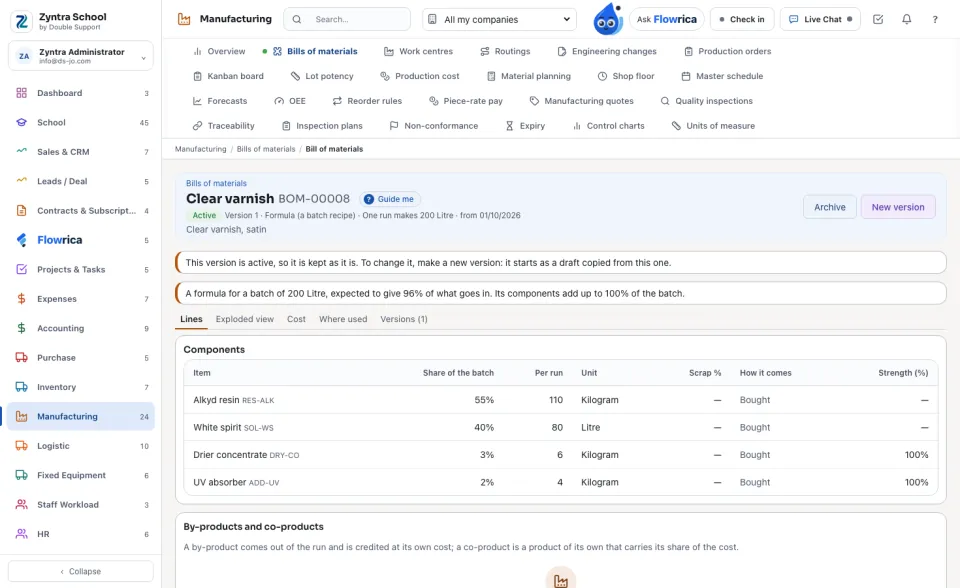
A formula is a recipe for paints, food, chemicals or medicines: each ingredient is a percent of the batch, so a batch of any size takes the same proportions. A batch is a production order of a formula: it says how much goes in, what it should give, the lots that went in and the yield it really gave. An active ingredient is taken by its strength: a weaker lot is taken in a larger quantity.
Where
Manufacturing › Bills of materials (a formula) · Manufacturing › Production orders (a batch) · Manufacturing › Lot potency
Who
A formula is written with the rights of bills of materials, and a batch with the rights of production orders: «Issue materials» chooses a batch's lots and issues the batch. «Read lot potency» reads the strength of each lot, and «Record a lot's potency» records it.
Write a formula
1
In Bills of materials press New bill of materials, choose the product and, under How it is made, Formula (a batch recipe). Type The batch it is written for (200 litres, 500 kilograms) and its unit, and the Yield expected (%): what a batch gives of what goes in.
2
Add each component with its Share of the batch as a percent. Its quantity is worked out for you: 55% of a 200 litre batch is 110 of the line's unit. For an active ingredient, type the Strength (%) the formula is written for, most often 100.
3
Activate it as any bill. A formula is activated only with its yield and a share on every component; the note above its lines says what the shares add up to.
By-products and co-products are added under the lines as in any bill. A new version of the formula written for another batch size takes every component's share with it.
Make a batch
1
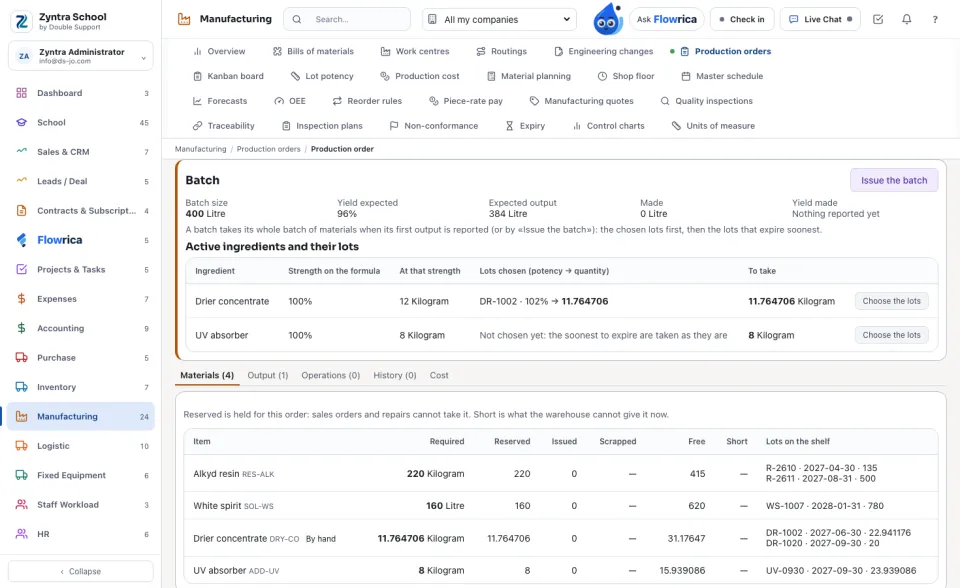
In Production orders press New production order and choose the formula's product. Type the Batch size: the quantity expected out is the batch times the yield, and every material is planned for the batch, in the formula's proportions.
2
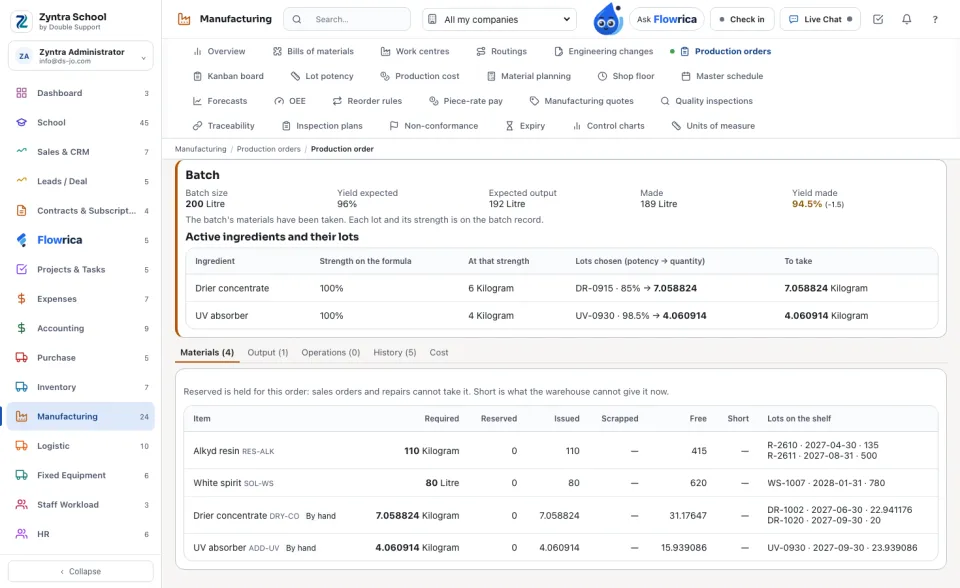
The order shows its Batch: the size, the yield expected, the output expected, what was made and the Yield made. Under it, each active ingredient with its strength on the formula and what that strength asks.
3
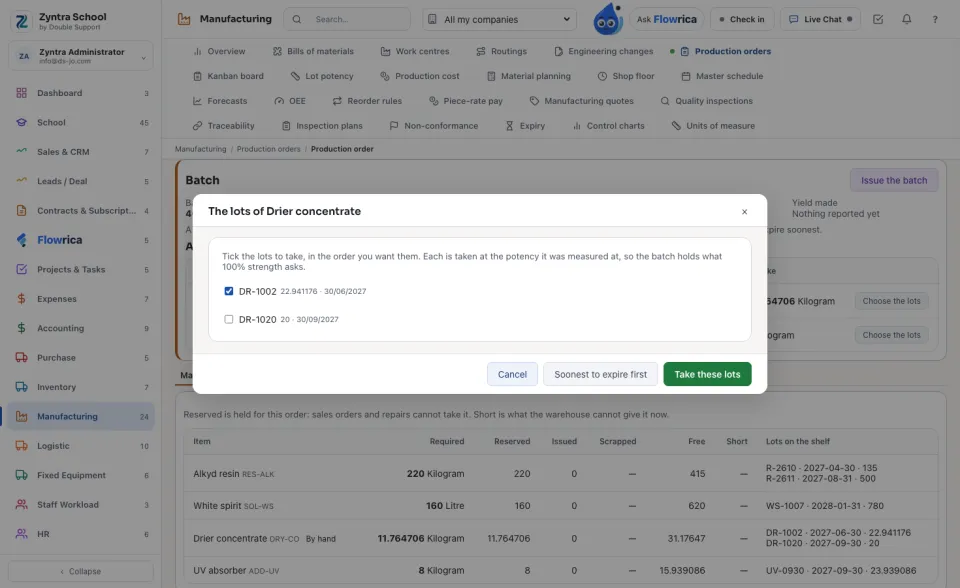
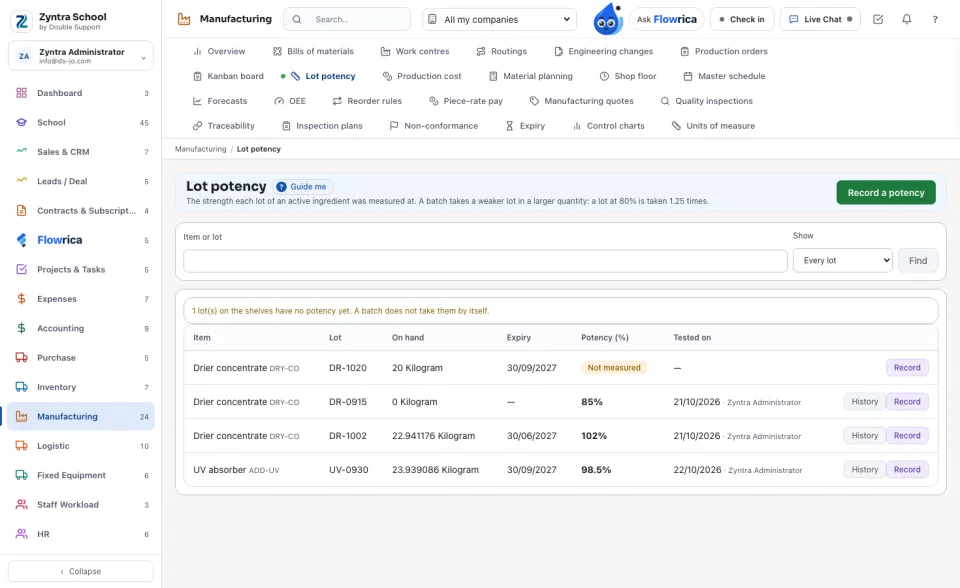
Press Choose the lots beside an active ingredient. Tick the lots to take, or press Soonest to expire first. Each lot is taken at the potency it was measured at: written for 100%, a lot at 80% is taken 1.25 times, and a lot at 102% a little less. A lot with no potency recorded is never taken by a guess.
4
Release the order. The batch takes its whole batch of materials when its first output is reported, or when you press Issue the batch: the chosen lots first, then the lots that expire soonest, never an expired one. Report the output as on any order; finish it when the batch is done.
Press Batch record at the top of the order for its paper: the formula and version, the batch size, the yields, every ingredient with its share, every lot that went in with its expiry and strength, the lots it was put on the shelf under, the operations, and boxes for the signatures.
Lot potency
Lot potency lists every lot on your shelves of an active ingredient, the ones Not measured first. Press Record on a lot, type its Potency (%) and the day it was tested. A new measurement puts the one before away; History shows them all, and a batch already made keeps the strength it was made by.
Nothing is deleted: lots chosen again are kept with their day, and every step is on the order's history and the audit trail.
Questions
Where is “Formulas and batches” in Zyntra OS?
Manufacturing › Bills of materials (a formula) · Manufacturing › Production orders (a batch) · Manufacturing › Lot potency
Who can use “Formulas and batches”?
A formula is written with the rights of bills of materials, and a batch with the rights of production orders: «Issue materials» chooses a batch's lots and issues the batch. «Read lot potency» reads the strength of each lot, and «Record a lot's potency» records it.
FlowricaUsually replies instantly
We’d like to use Google Analytics to see how this site is used. Nothing is set unless you accept.


 Zyntra OS
 Zyntra Legal
 Zyntra Real Estate
 Zyntra Hotel
 Zyntra E-commerce
 Zyntra Appointments
 Zyntra Repair
 Zyntra Garage
 Zyntra Concierge
 Zyntra Contracting
 Zyntra Clinic
 Zyntra Dental
 Zyntra School
 Zyntra University
 Zyntra Call Center
 Zyntra OTA