

 Zyntra OS
 Zyntra Legal
 Zyntra Real Estate
 Zyntra Hotel
 Zyntra E-commerce
 Zyntra Appointments
 Zyntra Repair
 Zyntra Garage
 Zyntra Concierge
 Zyntra Contracting
 Zyntra Clinic
 Zyntra Dental
 Zyntra School
 Zyntra University
 Zyntra Call Center
 Zyntra OTA
Where
Manufacturing › Master scheduleWho
«Read the material plan» reads it; «Keep the master schedule, forecasts and reorder rules» adds, changes and archives its lines.Read the schedule
1
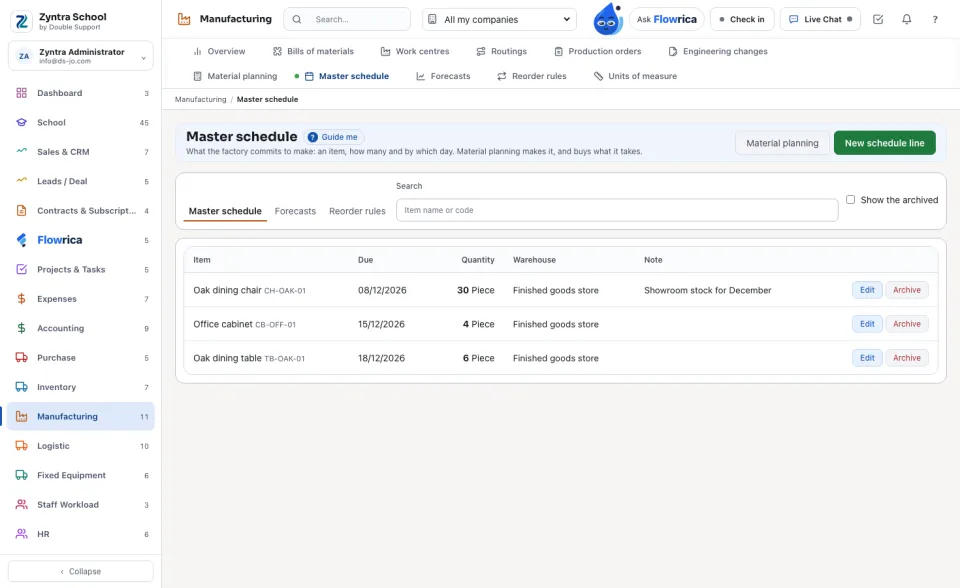
Each line says the Item, the day it is Due, the Quantity and the Warehouse it is made into (the item's own when none is named).
2
The tabs above the list open the Forecasts and the reorder rules beside it.
Add a line
1
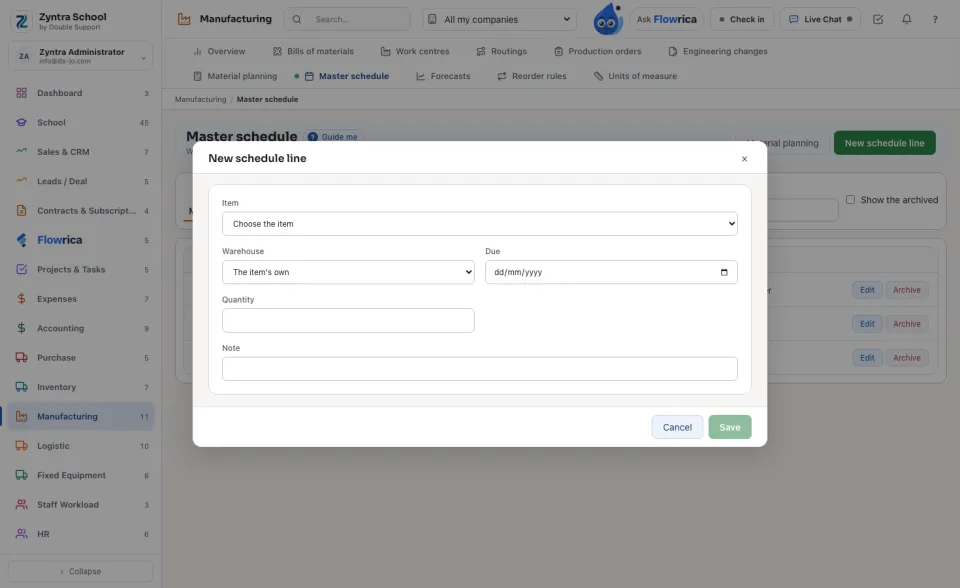
Press New schedule line. Choose the Item, the Warehouse, the day it is Due and the Quantity, and Save.
2
The next run plans it: a schedule line uses up the forecast of its period, so the two are never counted twice.
A line whose day has passed is no longer planned; change its day to plan it again.
Nothing is deleted: Archive takes a line out of the planning, Show the archived and Restore bring it back.
Questions
Where is “Master schedule” in Zyntra OS?
Manufacturing › Master schedule
Who can use “Master schedule”?
«Read the material plan» reads it; «Keep the master schedule, forecasts and reorder rules» adds, changes and archives its lines.