

 Zyntra OS
 Zyntra Legal
 Zyntra Real Estate
 Zyntra Hotel
 Zyntra E-commerce
 Zyntra Appointments
 Zyntra Repair
 Zyntra Garage
 Zyntra Concierge
 Zyntra Contracting
 Zyntra Clinic
 Zyntra Dental
 Zyntra School
 Zyntra University
 Zyntra Call Center
 Zyntra OTA
Where
Manufacturing › OEEWho
«Read the shop floor». The same figures show on the asset's availability in Fixed equipment.Read it
1
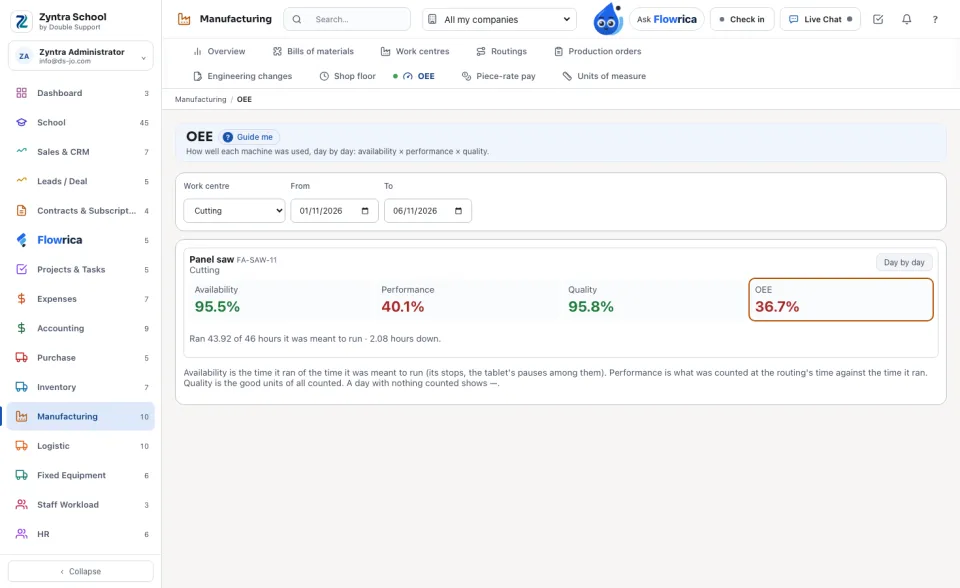
Choose the Work centre (or every one) and the period. Each machine of a work centre shows its four figures over the period.
2
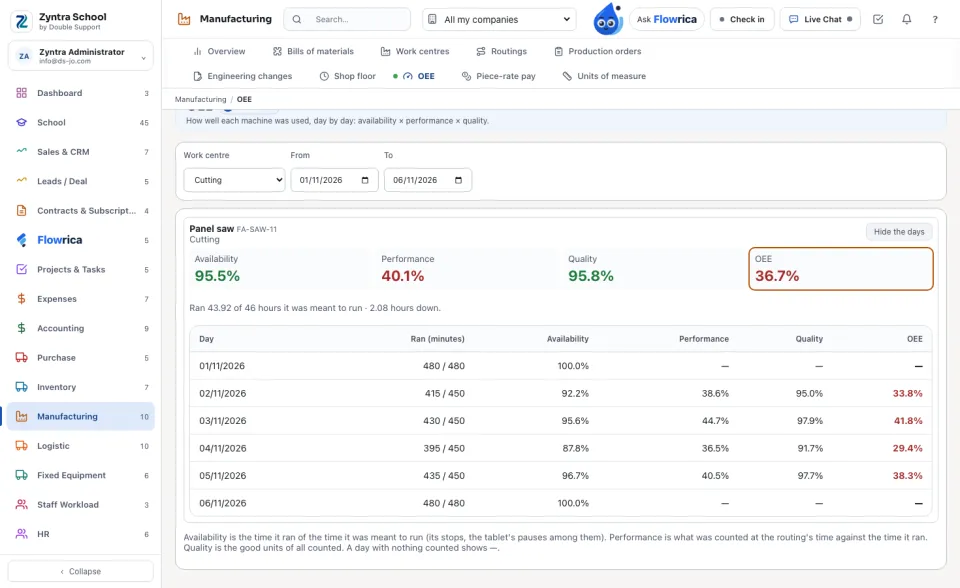
Day by day opens each day: the minutes it ran of the minutes it was meant to run, and the four figures of that day.
How each figure is made
1
Availability: the time it ran of the time it was meant to run — its planned hours a day, less planned stops (a break, planned maintenance), less breakdowns. A pause at the tablet is such a stop.
2
Performance: the units counted on it × the routing's minutes a unit, against the time it ran.
3
Quality: the good units of all units counted.
Over a period, performance and quality are weighed by what was counted each day, not averaged.
A day with nothing counted shows —: nothing is guessed. A machine with no tablet counts shows its availability only.
Questions
Where is “OEE” in Zyntra OS?
Manufacturing › OEE
Who can use “OEE”?
«Read the shop floor». The same figures show on the asset's availability in Fixed equipment.