Zyntra OS
 Zyntra Legal
 Zyntra Real Estate
 Zyntra Hotel
 Zyntra E-commerce
 Zyntra Appointments
 Zyntra Repair
 Zyntra Garage
 Zyntra Concierge
 Zyntra Contracting
 Zyntra Clinic
 Zyntra Call Center
 Zyntra OTA
Where
Leads / Deal › OverviewWho
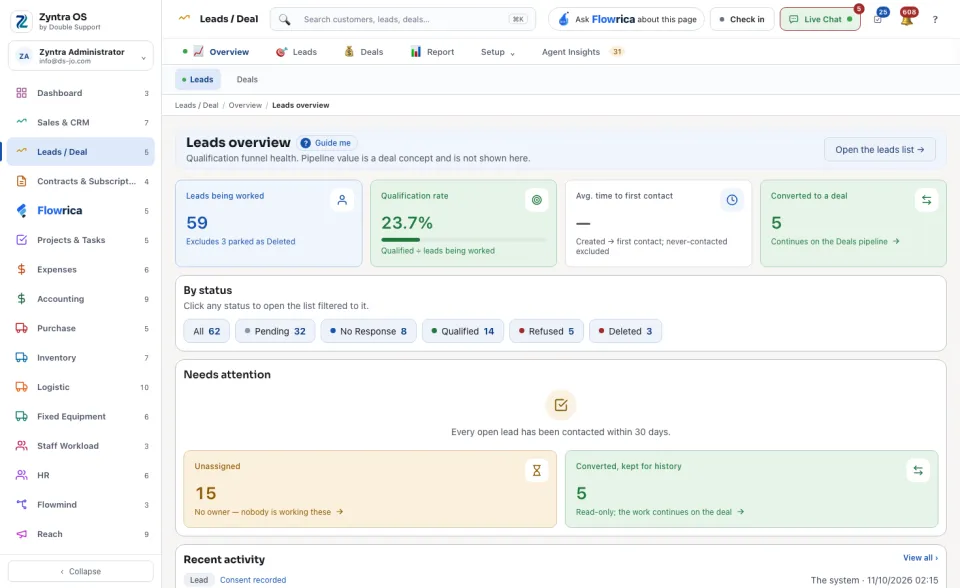
Anyone allowed to see this screen.The cards at the top show Leads being worked, the Qualification rate, the Avg. time to first contact and how many were Converted to a deal; each says under its figure how it is counted.
Under By status, press All or any status to open the list narrowed to exactly those leads. Needs attention warns about leads nobody has contacted for a while (Review → opens them), and counts the Unassigned leads and those Converted, kept for history. Recent activity lists the latest changes on leads and deals; View all › opens the full history. Open the leads list → takes you to the list itself.
What Flowrica does here
She can add a lead with you, one question at a time (Create a lead), and you can ask her about the screen, for example Leads won and lost this month
.