Zyntra OS
 Zyntra Legal
 Zyntra Real Estate
 Zyntra Hotel
 Zyntra E-commerce
 Zyntra Appointments
 Zyntra Repair
 Zyntra Garage
 Zyntra Concierge
 Zyntra Contracting
 Zyntra Clinic
 Zyntra Call Center
 Zyntra OTA
Where
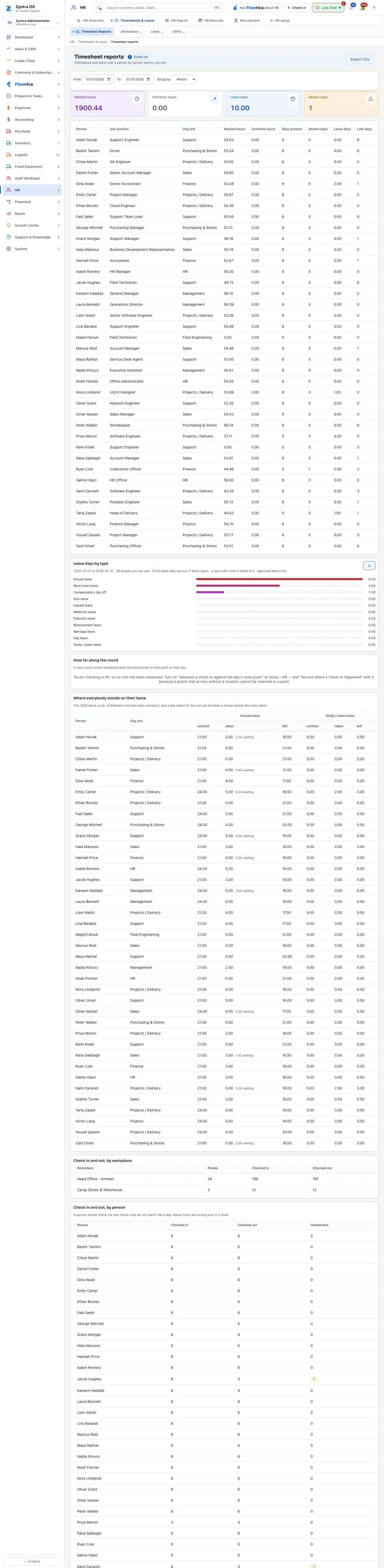
HR › Timesheets & Leave › Timesheet reportsWho
Anyone allowed to see this screen.1
Choose the dates with From and To.
2
Under Group by choose Person or Org unit.
3
Read the four totals (Worked hours, Overtime hours, Leave days, Absent days) and the table: for each row the worked and overtime hours, the days present, absent and on leave, and the late days.
Export CSV downloads the table as a file.