

 Zyntra OS
 Zyntra Legal
 Zyntra Real Estate
 Zyntra Hotel
 Zyntra E-commerce
 Zyntra Appointments
 Zyntra Repair
 Zyntra Garage
 Zyntra Concierge
 Zyntra Contracting
 Zyntra Clinic
 Zyntra Call Center
 Zyntra OTA
Where
Leads / Deal › Setup › Templates for won dealsWho
Anyone allowed to see the deal settings.1
Press + Rule. A new row appears.
2
In the row choose the Service type, the Size (or leave Any size) and the Template the project is made from.
3
Under the rules, choose the Project manager of the project made: The deal's owner or A fixed person. The project manager is told when the project is made, and checks its dates.
4
Press Save.
The same screen holds the two lists the rules choose from: Service types (what a deal sells; add one with + New service type) and Deal sizes (how big a deal is; add one with + New size).
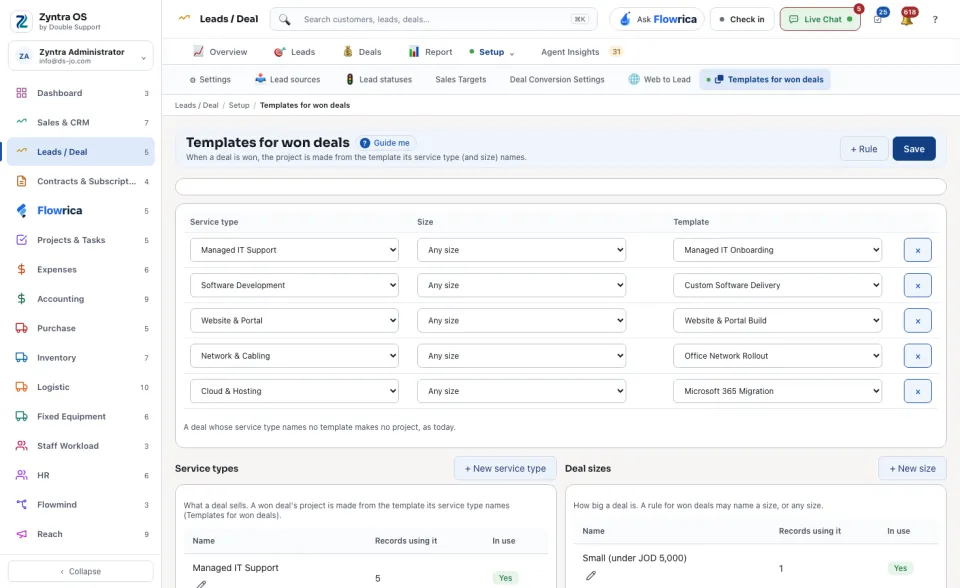
A deal whose service type names no template makes no project. A won deal with no start date starts today, and the project manager is told to check the dates.
See also: Win or lose a deal · Deal conversion rules