

 Zyntra OS
 Zyntra Legal
 Zyntra Real Estate
 Zyntra Hotel
 Zyntra E-commerce
 Zyntra Appointments
 Zyntra Repair
 Zyntra Garage
 Zyntra Concierge
 Zyntra Contracting
 Zyntra Clinic
 Zyntra Dental
 Zyntra School
 Zyntra University
 Zyntra Call Center
 Zyntra OTA
Where
School › OverviewWho
Any of the school's view rights; each part shows only what its right reaches.Switch it on
1
The super administrator opens Setup › Modules and switches School on. It needs Customers: a family is a customer and its guardians are the customer's contacts.
2
While it is on, the product's name is Zyntra School. It is never on together with another edition.
3
Give the people their rights in Setup › Roles: view, create, edit and delete for academic years and terms, grades and sections, students, guardians and admissions.
The overview
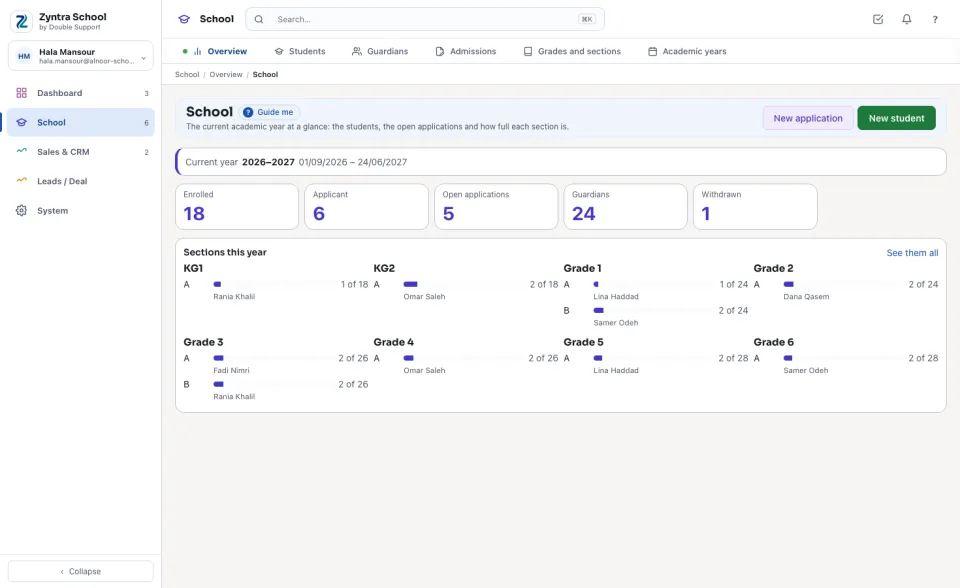
The current year and its days, then Enrolled, Applicant, Open applications, Guardians and Withdrawn — each opens its list — and Sections this year, grade by grade, with how full each section is and its homeroom teacher. New application and New student start from here.
Where to start
| Screen | What it is for |
|---|---|
| Academic years | The years and their terms; one is the current year. |
| Grades and sections | The grades, and each year's sections with capacity, room and homeroom teacher. |
| Students | Every student's file, guardians, enrolment history and documents. |
| Guardians | Every parent or guardian with their children. |
| Admissions | Applications, interviews, decisions and enrolment. |
| Online application | The school's own application page: the documents asked, the application fee, and each application landing in Admissions. |
| Re-enrolment | Next year's places for this year's students: the seat deposit, each grade's seats and the waiting list. |
| Activities and clubs | Clubs, sports, arts and trips: supervisor, hours, seats and waiting list, the term's fee, registration from the portal and attendance. |
| Forms and consent | Trip, photo and medical consent and surveys, sent to families and signed in the portal; who signed and who did not. |
| Portal access | Which guardians and students the portal is opened to, and which grades let students in. |
| Announcements | News to the whole school, a grade or a section, read in the portal. |
| Subjects and teachers | Each grade's subjects and each section's teacher of them. |
| Assessment plans | Each term's components, weights and pass mark, and the school's scale. |
| Marks | The mark sheets: entered by the teacher, approved, then released to the parents. |
| Homework | Homework set by the teacher, handed in through the portal, marked and returned. |
| Homework reports | Each section's hand-in rate, a student's missing homework and the teachers' load. |
| Messages | A teacher's conversations with the families and students of their classes, read for safeguarding, a teacher's announcements and the settings. |
| Message reports | Each teacher's messages and the questions left waiting longer than the school's hours. |
| Health and nurse | Each student's health file, the visits to the school nurse and the families' requests. |
| Health reports | Vaccinations due, severe allergies by section and the visits to the nurse. |
| Behaviour | Teachers' notes on their students, incidents and the steps of the ladder, meetings with families. |
| Behaviour reports | Points per student and section, incidents per category and month, students who reached a step. |
| Certificates | The official transcript and the school's certificates, issued with a serial, the stamp and a check code; the families' requests; the templates. |
| Certificate reports | The papers issued per kind and month, and the papers withdrawn. |
| Ministry exports | The files the ministry of education takes — enrolments, leavers, attendance totals, year results — in its own columns; the files made; the five ministries' connections. |
| Library | The library's books and copies, each copy with its barcode and state, and the library settings. |
| Lending desk | Lending and taking back, renewals, lost books, holds, and fines billed to the family. |
| Library reports | The most lent books, the overdue loans, the lost copies and a borrower's history. |
| Canteen counter | Selling at the canteen from each student's wallet, within the family's limit and bans. |
| Canteen wallets | Each student's wallet, top-ups at the desk, refunds and moves, what the canteen sells and its settings. |
| Canteen reports | Sales by day and by item, what is held for the families and the students below a balance. |
| Learning platforms | Google Classroom, Microsoft Teams for Education and Moodle: the sections you pick, their members, homework and grades kept in step. |
| Results and report cards | Term and year results, remarks and the report cards in English or Arabic. |
| Mark reports | The section mark sheet, subject averages and students at risk. |
Next: Academic years
Questions
Where is “Zyntra School” in Zyntra OS?
School › Overview
Who can use “Zyntra School”?
Any of the school's view rights; each part shows only what its right reaches.