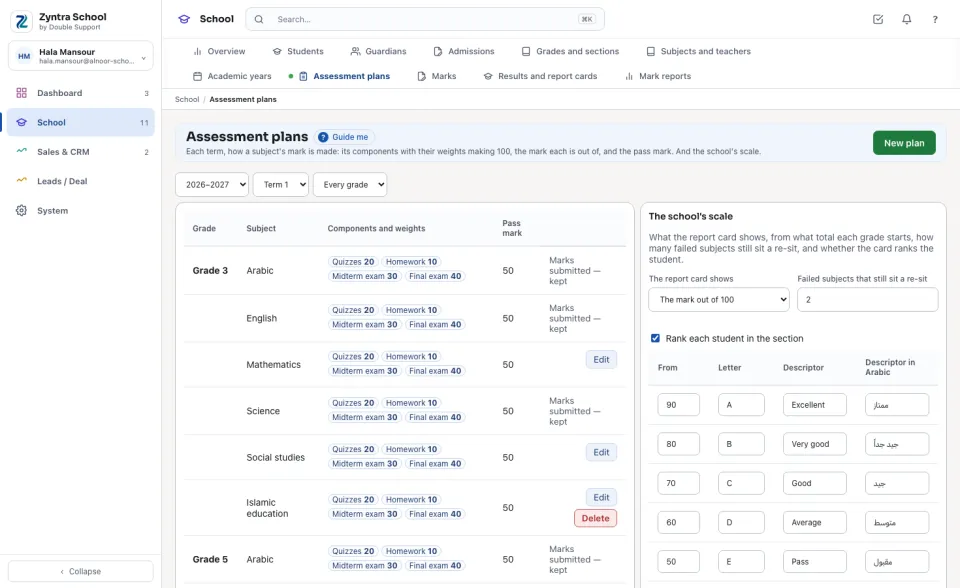
Each term, how a subject's mark is made: its components with their weights making 100, the mark each is out of, and the pass mark. And the school's scale.
Where
School › Assessment plans
Who
The assessment plans' view right reads them; making, changing and deleting a plan, and changing the scale, each have their own right.
Choose the year and the term. Each line is a grade's subject: its Components and weights (Quizzes 20, Homework 10, Midterm exam 30, Final exam 40) and its Pass mark. A student's term mark is out of 100: each component's mark divided by what it is out of, times its weight, added up. The school's scale beside it holds what the report card shows, from what total each letter and descriptor start (Jordan's bands to start from: 90 Excellent, 80 Very good, 70 Good, 60 Average, 50 Pass, below 50 Weak), how many failed subjects still sit a re-sit, and whether the card ranks the student.
Make a plan
1
Choose the term and press New plan.
2
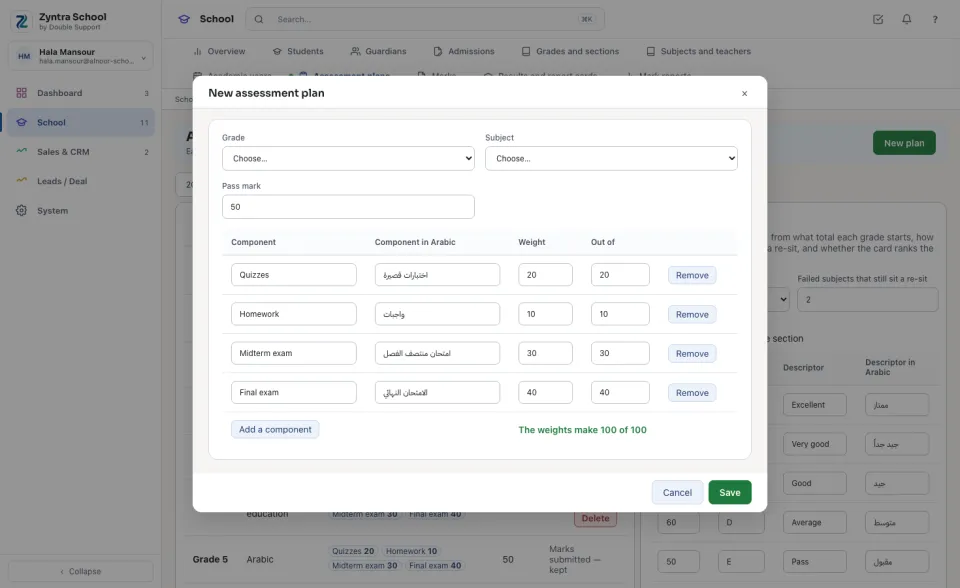
Choose the Grade and the Subject, and type the Pass mark. The four usual components are there to start from: change a Weight or what it is Out of, Add a component or Remove one, until the line under them reads 100 of 100.
3
Press Save. To give every other subject of the grade the same plan in this term, press Use for the grade's other subjects on its line.
Change the scale
1
Under The school's scale, choose what The report card shows: the mark out of 100, the mark and its letter, or the descriptor only (for the early grades).
2
Change the bands, the re-sit number and the rank as the school does them, and press Save the scale.
The weights always make 100, and one band starts at 0. Once a plan's marks are submitted its components are kept (the line reads «Marks submitted — kept»), so a total is never worked out again under a student.


 Zyntra OS
 Zyntra Legal
 Zyntra Real Estate
 Zyntra Hotel
 Zyntra E-commerce
 Zyntra Appointments
 Zyntra Repair
 Zyntra Garage
 Zyntra Concierge
 Zyntra Contracting
 Zyntra Clinic
 Zyntra Dental
 Zyntra School
 Zyntra University
 Zyntra Call Center
 Zyntra OTA