

 Zyntra OS
 Zyntra Legal
 Zyntra Real Estate
 Zyntra Hotel
 Zyntra E-commerce
 Zyntra Appointments
 Zyntra Repair
 Zyntra Garage
 Zyntra Concierge
 Zyntra Contracting
 Zyntra Clinic
 Zyntra Dental
 Zyntra University
 Zyntra Call Center
 Zyntra OTA
Where
School › Academic yearsWho
School Academic years and terms — View; making, changing and deleting each have their own right.Each year shows its days, how many Sections and Students it holds, and its Terms. The current year is marked Current.
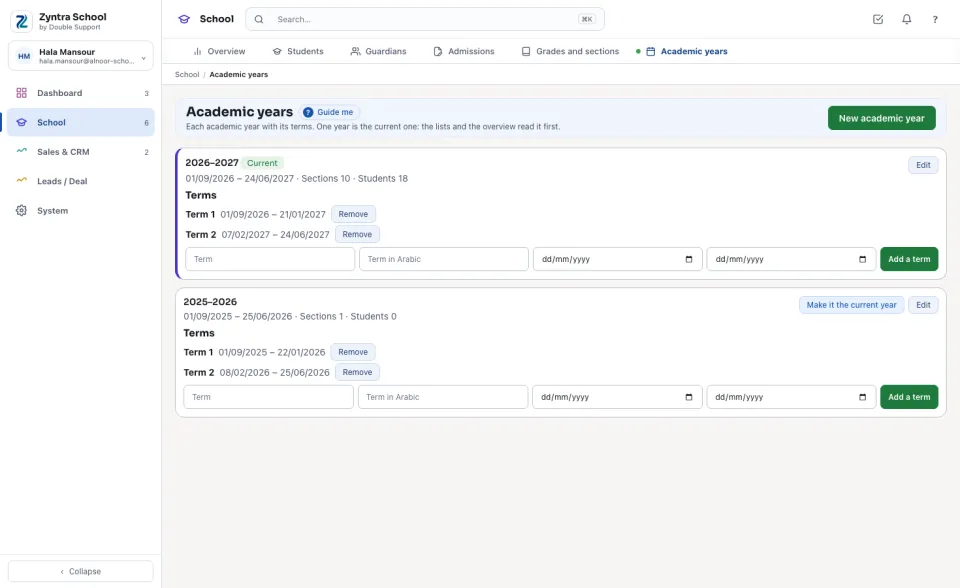
Make a year
1
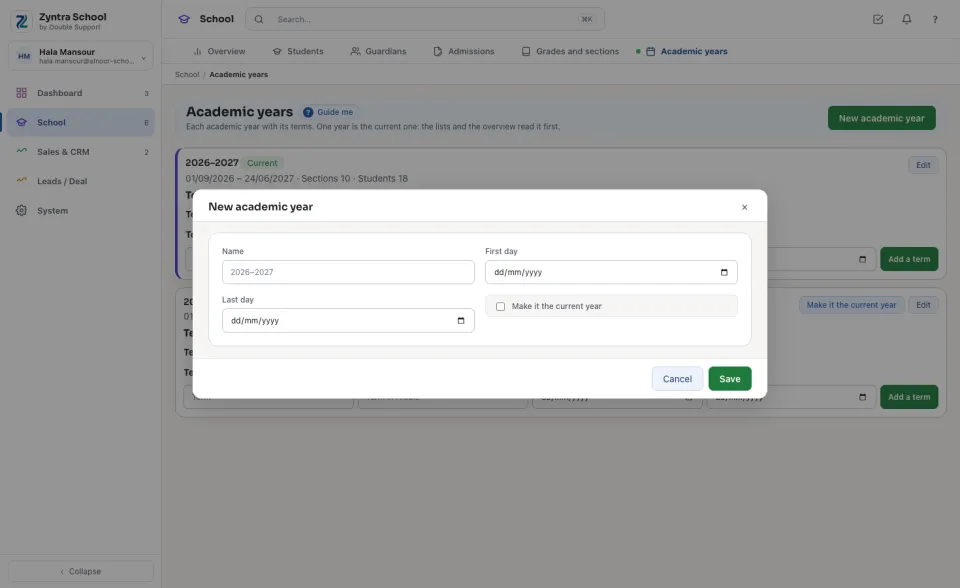
Press New academic year.
2
Type the Name (2026–2027), the First day and the Last day. Tick Make it the current year to make it current; the first year of a company is current by itself.
3
Press Save. Then add its terms under it: the term's name in English and Arabic, its first and last day, and Add a term.
A name is never used twice, the last day comes after the first, and a term always falls inside its year. A year with sections, students or applications is kept, never deleted.
A school that works in the Hijri calendar types its days and names its years in Hijri: Hijri dates.
Before:  Zyntra School · Next: Grades and sections
Questions
Where is “Academic years” in Zyntra OS?
School › Academic years
Who can use “Academic years”?
School Academic years and terms — View; making, changing and deleting each have their own right.