

 Zyntra OS
 Zyntra Legal
 Zyntra Real Estate
 Zyntra Hotel
 Zyntra E-commerce
 Zyntra Appointments
 Zyntra Repair
 Zyntra Garage
 Zyntra Concierge
 Zyntra Contracting
 Zyntra Clinic
 Zyntra Dental
 Zyntra School
 Zyntra University
 Zyntra Call Center
 Zyntra OTA
Where
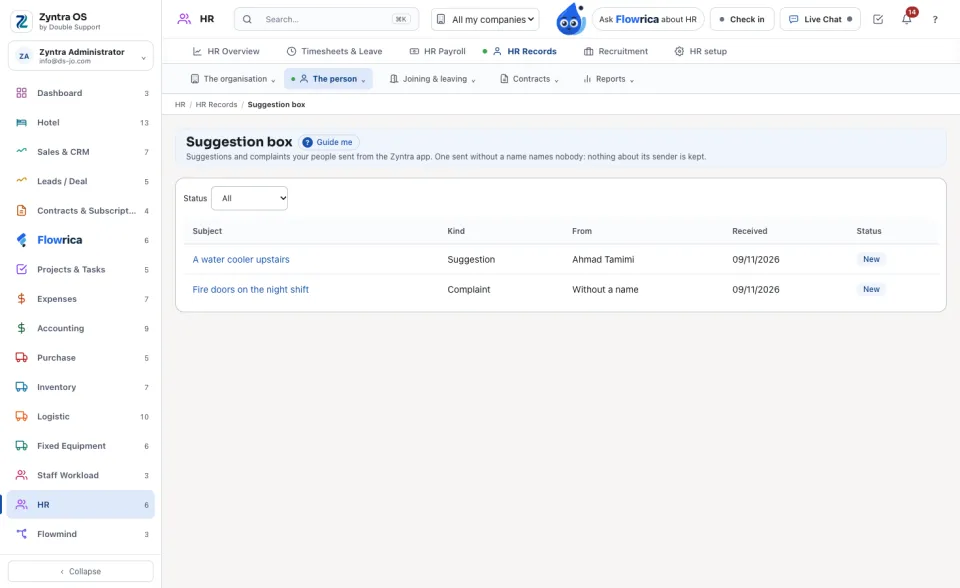
HR › HR Records › The person › Suggestion boxWho
Anyone given «Suggestion box · Read suggestions and complaints». Answering and closing need «Suggestion box · Answer and close».1
Each one is a row with its Subject, its Kind, who it is From (or Without a name), the day it was Received and its Status. Narrow the list by Status.
2
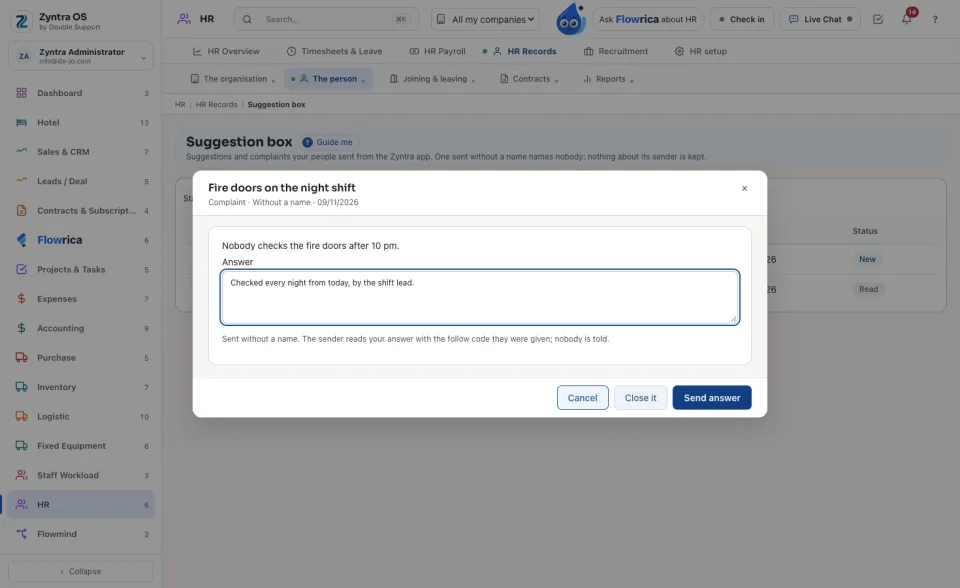
Press a subject to read it. A new one becomes Read.
3
Write in Answer and press Send answer, or press Close it.
A sender who gave their name is told on their bell. A sender without a name reads the answer in the app with the follow code they were shown once; nobody else can be told, because the row names nobody.
Questions
Where is “Suggestion box” in Zyntra OS?
HR › HR Records › The person › Suggestion box
Who can use “Suggestion box”?
Anyone given «Suggestion box · Read suggestions and complaints». Answering and closing need «Suggestion box · Answer and close».