

 Zyntra OS
 Zyntra Legal
 Zyntra Real Estate
 Zyntra Hotel
 Zyntra E-commerce
 Zyntra Appointments
 Zyntra Repair
 Zyntra Garage
 Zyntra Concierge
 Zyntra Contracting
 Zyntra Clinic
 Zyntra Call Center
 Zyntra OTA
Where
Accounting › The books › Period-end revaluationWho
People whose role may see the accounting settings.The balances are a customer's, a vendor's, or a cash or bank account's. If none of your companies keeps its own books, the screen says there is nothing to revalue.
1
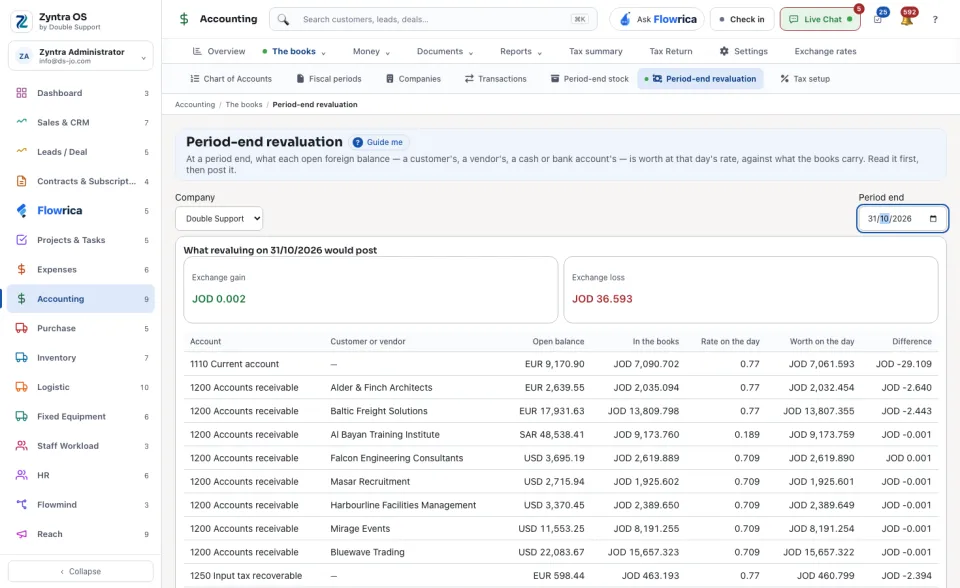
Choose the Company and the Period end.
2
Read what revaluing would post: the Exchange gain and the Exchange loss.
3
Check the table: each Account and Customer or vendor with its Open balance, what it is In the books, the Rate on the day, what it is Worth on the day and the Difference. Balances that are fully settled are not revalued; the screen says how many.
4
Press Post the revaluation. It records the difference on each balance on the period end, and takes it back the next day, so it shows only in that period's statements.
The rate on the day comes from Exchange rates.
Revaluations lists the ones already posted. Undo the revaluation asks for a reason and reverses both entries; the revaluation is kept and marked undone. Only the latest one can be undone.