Zyntra OS
 Zyntra Legal
 Zyntra Real Estate
 Zyntra Hotel
 Zyntra E-commerce
 Zyntra Appointments
 Zyntra Repair
 Zyntra Garage
 Zyntra Concierge
 Zyntra Contracting
 Zyntra Clinic
 Zyntra Call Center
 Zyntra OTA
Where
Accounting › Tax summaryWho
People whose role may see tax returns.1
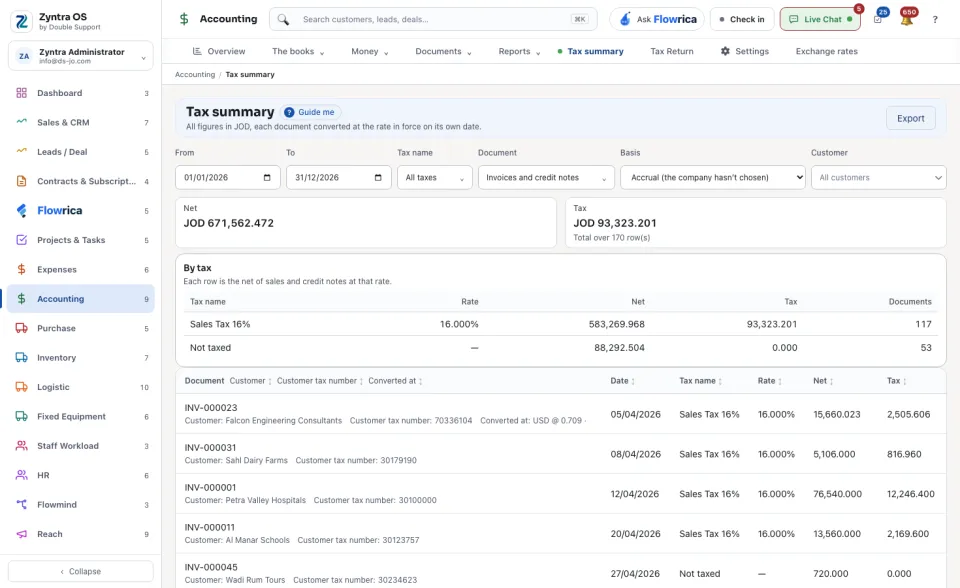
Choose the dates: From and To.
2
Narrow it. All taxes opens the list of taxes; Invoices and credit notes opens the kinds of document (Invoices only, Credit notes only, Invoice cancellations only, Undone cancellations only); Basis is Accrual or Cash; Customer keeps one customer.
3
Read the totals: Net and Tax, and how many rows they cover. By tax then gives one row per tax with its Rate, Net, Tax and the number of Documents.
4
Below it every document is listed with its Customer, Customer tax number, Date, Tax name, Rate, Net and Tax. A document in another currency says Converted at which rate. Press a column name to sort by it.
5
The period as a return, at the bottom, lays the same period out as a return would: Sales, Purchases, the Balance owing for the period and the Total amount due.
6
Export downloads it.
On the cash basis a document counts by the share of it settled in the period, on the day it was settled. A document with no exchange rate on its date is named under Documents with no exchange rate and left out of the totals: record the rate under Exchange rates.
This screen is for reading. The return itself is filed from The tax return.