Zyntra OS
 Zyntra Legal
 Zyntra Real Estate
 Zyntra Hotel
 Zyntra E-commerce
 Zyntra Appointments
 Zyntra Repair
 Zyntra Garage
 Zyntra Concierge
 Zyntra Contracting
 Zyntra Clinic
 Zyntra Call Center
 Zyntra OTA
Where
Sales & CRM › Sales OverviewWho
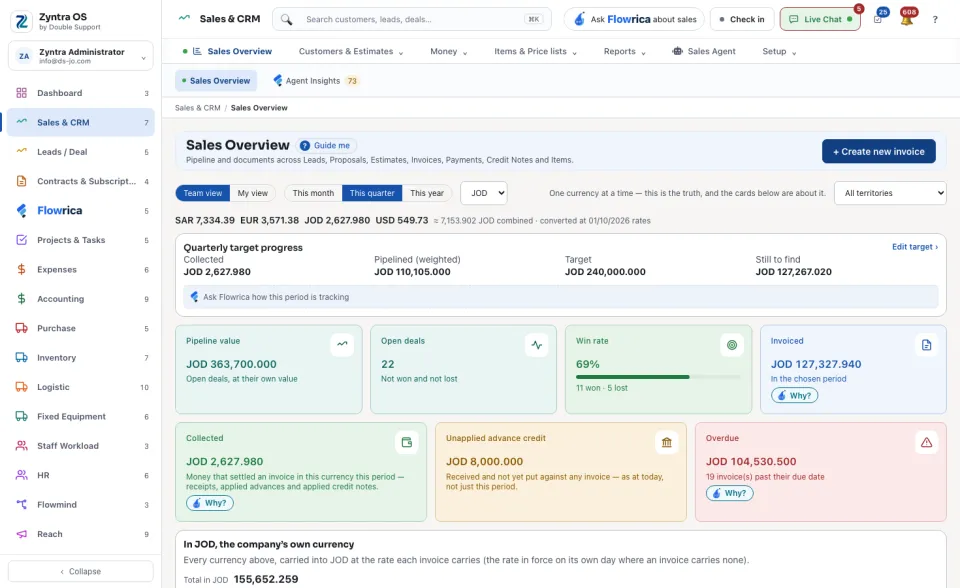
Anyone allowed to see this screen.Switch between Team view and My view, pick This month, This quarter or This year, and choose the currency: the cards are about one currency at a time.
The cards then show Pipeline value, Open deals, Win rate, Invoiced, Collected, Unapplied advance credit and Overdue. Each says under its figure what it counts, and Why? explains a figure. Quarterly target progress stands beside them (Edit target › changes it), with Ask Flowrica how this period is tracking.
Further down: the Pipeline funnel, the Revenue trend of the last six months, the Loss reason analysis, Documents by status, the Rep leaderboard, Document conversion, Upcoming renewals, Engagement and Recent activity.
In Needs attention, tick overdue invoices and press Send the overdue reminder, or choose a person under Reassign to and press Reassign. If you may raise invoices, + Create new invoice starts one from here.
What Flowrica does here
She can make a customer, an invoice or an estimate with you from here, one question at a time; nothing is saved until you press the form's own button. You can ask her about the screen, for example How much is overdue?