Zyntra OS
 Zyntra Legal
 Zyntra Real Estate
 Zyntra Hotel
 Zyntra E-commerce
 Zyntra Appointments
 Zyntra Repair
 Zyntra Garage
 Zyntra Concierge
 Zyntra Contracting
 Zyntra Clinic
 Zyntra Call Center
 Zyntra OTA
Where
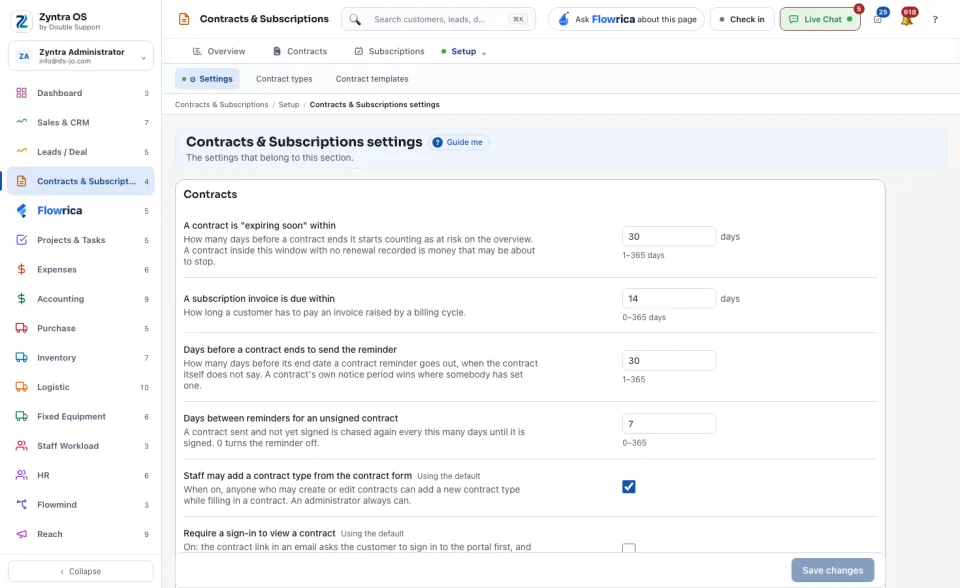
Contracts & Subscriptions › Setup › SettingsWho
Anyone allowed to change these settings.1
Change a setting. Each one says under its name what it does.
2
Press Save changes.
| Setting | What it decides |
|---|---|
| A contract is "expiring soon" within | How many days before its end a contract counts as at risk on the overview. |
| A subscription invoice is due within | How long a customer has to pay an invoice raised by a billing cycle. |
| Days before a contract ends to send the reminder | When the reminder goes out, if the contract itself does not say. |
| Days between reminders for an unsigned contract | How often a contract that was sent and not signed is chased. 0 turns it off. |
| Staff may add a contract type from the contract form | Whether people who fill a contract may add a new type there. |
| Require a sign-in to view a contract | Whether the customer must sign in to the portal before the contract opens. |
| Show the company signature on the contract PDF | Whether the PDF carries your company's signing block. |
| Paper for the contract PDF | The paper size of the PDF. |
| Hour of day to perform automatic operations | The hour the daily automatic work runs. |
| Subscription payment — what the customer is sent | What goes to the customer when a subscription payment is due. |
A setting marked Using the default has not been changed for this company.