Zyntra OS
 Zyntra Legal
 Zyntra Real Estate
 Zyntra Hotel
 Zyntra E-commerce
 Zyntra Appointments
 Zyntra Repair
 Zyntra Garage
 Zyntra Concierge
 Zyntra Contracting
 Zyntra Clinic
 Zyntra Call Center
 Zyntra OTA
Where
System › Utilities › Ticket Pipe LogWho
Anyone allowed to see the pipe log.1
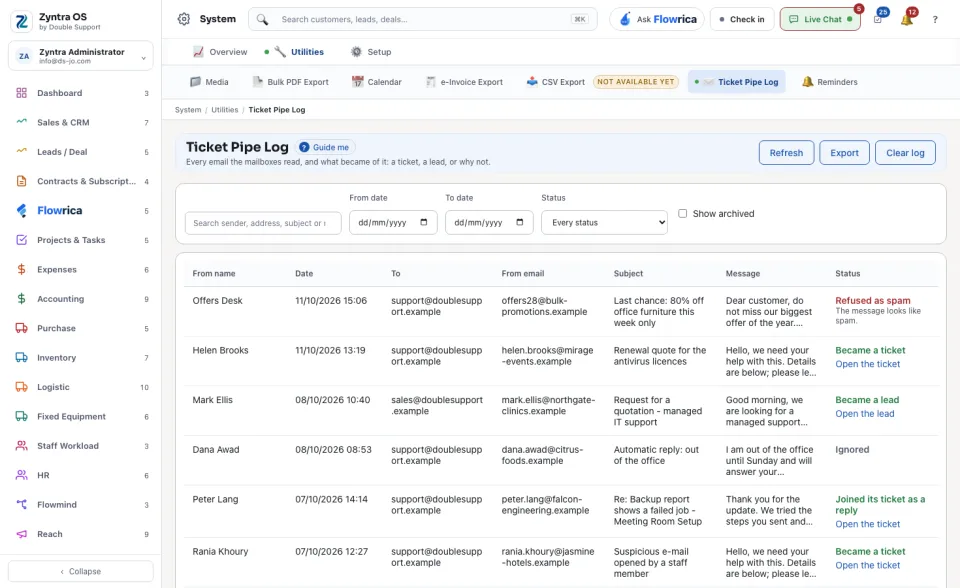
Narrow the list by From date, To date and Status. The status says what became of the email: Became a ticket, Joined its ticket as a reply, Became a lead, Read as a bounce, Ignored, Refused as spam, Refused or Error.
2
Read the row to see who wrote, when, the subject, and its status. Where the email became a ticket or a lead, the row leads to it.
3
Refresh reads the list again. Export saves the rows shown to a file.
Clear log archives the rows shown; they stay readable under Show archived. Nothing is deleted.